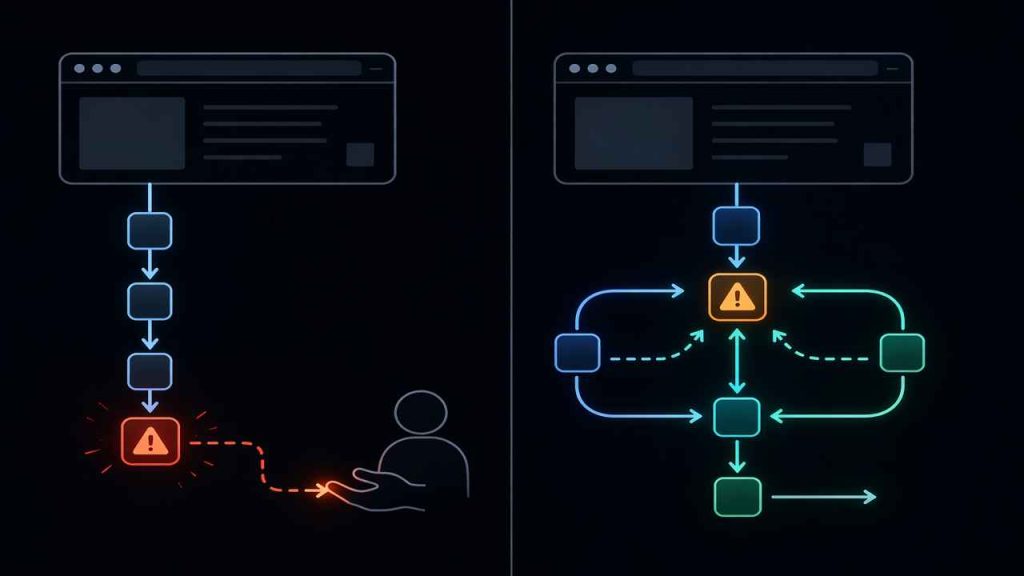
Most explanations of agentic browsers start with automation.
That’s the wrong starting point.
A traditional browser can already be automated with tools like Playwright or Puppeteer. If automation was the real difference, agentic browsers wouldn’t exist as a separate category.
The real shift is this:
Who is responsible when the workflow breaks?
Once you look at it this way, the difference becomes much clearer.
What Traditional Browsers Actually Do
A traditional browser is an execution layer.
It loads pages, runs JavaScript, renders UI, and responds to input. When combined with automation tools, it can follow predefined steps very efficiently.
But it has one hard limitation:
It does not decide what to do next.
Every action must be defined in advance:
- Click this button
- Wait for this selector
- Extract this data
If anything changes — layout, timing, structure — the system does not adapt. It fails.
And when it fails, the responsibility moves back to you:
- Fix selectors
- Adjust timing
- Rebuild logic
This model works well in stable environments.
It becomes fragile in dynamic ones.
What Agentic Browsers Introduce
An agentic browser adds a decision layer on top of execution.
Instead of running fixed instructions, it operates in a loop:
Goal → Interpret → Act → Observe → Adjust
This changes two things:
1. Actions are derived, not predefined
The system decides:
- Which element to interact with
- How to proceed when multiple paths exist
- When to retry or switch strategies
2. Failure becomes part of the process
Instead of stopping on error, it:
- Re-evaluates the page
- Attempts alternative approaches
- Continues toward the goal
This is not just automation.
It is adaptive execution under uncertainty.
The Real Gap: Who Handles Uncertainty
Here is the actual difference, stripped down:
| Situation | Traditional Browser | Agentic Browser |
|---|---|---|
| Selector breaks | Script fails | Finds alternative |
| Page structure changes | Requires manual fix | Reinterprets layout |
| Multi-step workflow | Hardcoded | Goal-driven |
| Unexpected state | Stops | Adjusts |
The gap is not capability.
Both can:
- Load pages
- Click buttons
- Extract data
The gap is:
Who absorbs the cost of change?
Where Traditional Browsers Still Make Sense
Agentic systems are not always better.
There are clear cases where traditional browsers are the right choice.
Stable, repeatable workflows
If the page structure is predictable and rarely changes, deterministic scripts are faster and easier to maintain.
High-scale execution
Agentic layers introduce:
- Latency
- Additional compute
- Decision overhead
At scale, this cost matters.
Strict control requirements
If you need:
- Exact reproducibility
- No deviation
- Full auditability
Agentic behavior can become a liability.
Where Agentic Browsers Start to Win
The advantage shows up when reality stops being clean.
Unstable frontends
- Frequent UI changes
- Dynamic rendering
- Anti-bot variations
Long-running workflows
- Multi-step navigation
- Conditional branching
- Session-based interactions
Tasks with real failure cost
- Account operations
- Data submission
- Monitoring workflows
In these cases, the cost of manual fixes quickly exceeds the overhead of adaptive systems.
A More Accurate Mental Model
The biggest mistake is thinking:
Agentic browser = better browser
A better model is:
- Traditional browser → execution engine
- Agentic browser → execution + reasoning system
It’s closer to:
Browser + decision loop + task memory
This is why the design approach changes.
You don’t write:
- Exact steps
You define:
- Goals
- Constraints
- Success conditions
Where Web4Browser Fits
Most discussions about agentic browsers stay theoretical.
In practice, the challenge is not just adding a “decision loop,” but making it usable in real workflows where pages are inconsistent and failure is common.
That’s where a browser designed for agentic workflows becomes different from a passive execution tool. Instead of treating the browser as something that only executes scripts, this approach shifts part of the responsibility into the runtime itself — allowing it to interpret page state, adjust interaction paths, and continue tasks even when the structure is no longer predictable.
If you want to see more about how this approach works, check out our article on how agentic browsers change browsing workflows.
The Trade-Off Most People Ignore
Agentic systems don’t just solve problems.
They introduce new ones:
- Incorrect decisions
- Over-adjustment
- Harder debugging
- Less predictability
So the real question is not:
“Is agentic better?”
It’s:
“Where do you want uncertainty to live?”
- In your code
- Or inside the system
How to Decide
Use this simple rule:
Choose a traditional browser when:
- The flow is stable
- Failures are rare
- You need full control
Choose an agentic browser when:
- The environment is unpredictable
- Workflows break often
- Manual intervention is expensive
This is not a feature comparison.
It’s a shift in responsibility.
Traditional browsers push uncertainty to the developer.
Agentic browsers pull part of that uncertainty into the system.
And that trade-off — not automation — is what actually matters.