Instruction
Defines the browser work Web4 should complete.
EXAMPLE TASK“Export yesterday's completed orders”Per-run task scope
Web4 Browser · AI antidetect browser & multi-accounting workspace
Select a saved Web4 profile, describe the browser work in natural language, and run it with that profile's browser identity, session state, network context and execution context already attached.
HOW IT WORKSAI changes the execution surface—not the browser environment. The instruction defines the work; the selected saved profile remains the reference environment for that run.
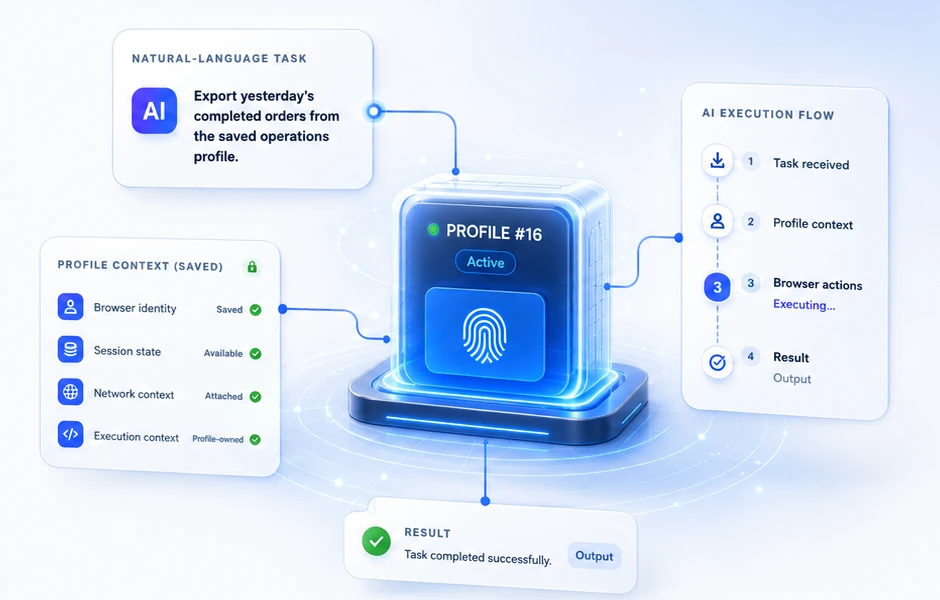
The instruction is a per-run task definition. The selected saved profile remains the browser environment for that run, so Web4 can reuse its existing identity, session, network and execution context before carrying out browser actions.
Defines the browser work Web4 should complete.
The outcome produced by this browser run.
A reviewable record that supports later review, troubleshooting and handoff.
The instruction describes the browser work for this run. It does not carry the saved profile's browser identity, session state or network routing.
Profile #16 remains the selected browser environment. Its identity, session, network and execution context are available to the AI workflow instead of being rebuilt for the task.
The task result belongs to the current run. Activity and execution records provide a reviewable trace for later review, troubleshooting and handoff.
The selected profile already owns browser identity, session state, network context and execution context. AI Browser Workflows reuse those profile-scoped layers; the control surface changes to AI, not the underlying browser environment.
One persistent browser environment
Browser identity stays associated with Profile #16.
Cookies, storage and login state remain profile-scoped.
Per-profile routing and network context remain in the environment.
The execution context remains with the same saved profile.
Runs from Profile #16
AI executes tasks using the reused context.
The environment stays the same.
These layers belong to the profile and persist across runs.
Only the control surface changes to AI. The environment does not.
Context reuse does not mean four new configurations are created for every AI task. The run starts from the browser environment the user already selected, while the instruction remains responsible for describing the work to perform.
A task has two independent inputs that come together for one AI browser run.
The instruction defines what to do. The saved profile defines where and how it runs.
Describe the task in natural language. Break it down into clear parts.
What is the main goal of this task?
Which sites or data should be included or excluded?
What output or outcome should be produced?
AI executes the task using the reused environment.
Provides a ready-to-use browser environment. Context stays with the profile across runs.
Browser fingerprint and device identity stay the same.
Cookies, local storage and login state are preserved.
The configured network binding is reused; route-derived IP and observable network signals follow the active connection.
Profile-owned extensions and local configuration persist; current navigation, DOM state and run outputs remain run-specific.
Defines what the AI needs to accomplish.
Provides the environment to run the task in.
Instruction and environment come together for one run.
Change the instruction to change the work.
Change the profile to change the environment.
The instruction and the saved profile are independent. Many different instructions can run in the same profile. The same instruction can run in different profiles.
Manual browsing, AI Browser Workflows and Headless/CDP are different ways to run browser work. Skills & MCP extend repeatable steps and approved tool connections. The saved profile remains the browser environment underneath them.
| MODE | PRIMARY CONTROL | PROFILE RELATIONSHIP | NEXT |
|---|---|---|---|
| Manual Browser | A person drives the browser directly. | Opens the same saved profile and its existing context. | Profile context → |
| AI Browser Workflow | Natural-language instructions drive browser work. | Executes inside the selected saved profile. | This page → |
| Headless & CDP | Programmatic automation controls the browser. | Uses the same saved profile without rebuilding context. | Headless & CDP → |
| Skills & MCP | Reusable steps and approved MCP tools extend workflows. | Extends browser work around the profile; it is not a new identity layer. | Skills & MCP → |
One saved profile. Many control surfaces. Switching the control method never creates a new identity; it only changes how work gets done.
Activity and execution records capture evidence around browser work. They support review, troubleshooting and handoff—while external platforms and their decisions remain outside Web4 control.
Workflow executes inside the selected browser environment.
Reviewable evidence around what happened in the browser work.
Records describe work around the workflow.
The selected saved profile remains the environment reference.
Inspect records to understand what happened.
Use records as evidence when a workflow needs investigation.
Give another authorized teammate context about what happened.
Web4 records what happens around browser work.
It does not control external platforms or their decisions.
Browser identity remains the selected saved profile.
Network routing remains part of the browser environment.
AI is not the same thing as Headless/CDP.
External platform decisions remain external.
AI Browser Run
Workflow executes inside the browser environment.
Reviewable Record
Evidence around what happened.
Review, Troubleshoot, Handoff
Evidence for teams to understand and coordinate.
Control Over External Platform Decisions
External outcomes remain outside Web4 control.
The record layer is for evidence and coordination, not for altering external outcomes. Web4 helps you understand what happened around browser work; it does not change what external sites, accounts or services decide.
Create a free account, then apply for Windows trial access when you are ready to test Web4 Browser. Trial access is by approval.