
A team may have separate browser profiles for every client account and still fail the moment one operator is unavailable.
The real test is not whether every account has a separate browser profile. The real test is whether another teammate can safely continue the work without guessing which profile, session, or notes to trust.
If the handoff depends on chat messages, screenshots, password reminders, local notes, and guessing which Chrome profile still has the active login, the team does not have browser profile management. It has individual browser habits that happen to use profiles.
The Handoff Test
For a team using multi-account browser profiles, the handoff test is simple:
Can a second operator open the correct account environment and continue the assigned work in under ten minutes without rebuilding context from memory?
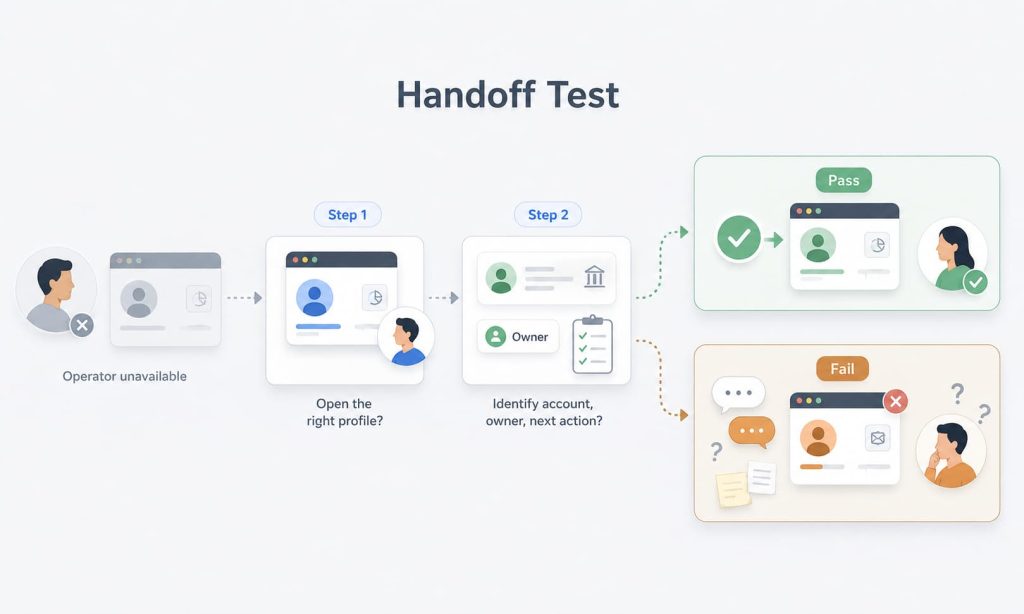
If the answer is no, the weak point is usually not the person taking over. The weak point is the missing link between the browser profile, the account it represents, and the team rule for who is allowed to use it.
This is where many teams misread the problem. They think they need more profiles. In reality, they need profile-to-account mapping, ownership, and access rules attached to the profiles they already use.
A Common Team Failure Pattern
Consider a typical agency workflow.
One operator manages a client ad account from a local browser profile. Another teammate needs to pause a campaign, verify a budget change, or check a rejected ad while the first person is offline. The team knows the account exists, but the browser environment lives on the first operator’s machine, and the notes about login state are scattered across messages.
The second teammate may create a new profile, ask for a password, reuse another session, or wait for the original operator. Each choice creates friction. Worse, none of those choices gives the team a stable account handoff process.
That is the moment when shared browser profiles become operational debt. The team has separation at the browser level, but it does not have accountability at the workflow level.
A Profile Is Not Team-Ready Until Ownership Is Clear
A team browser profile should answer one question before anyone opens it:
Who owns this account environment right now?
Ownership does not only mean who created the profile. It means who is responsible for the account, who can access it, who can change the environment, and who should approve a handoff.
Without that ownership, shared browser profiles become loose containers for login sessions.
That is where mistakes begin. One operator updates the wrong account. Another teammate changes settings to solve a short-term login issue. A third person reuses a profile because it still has an active session.
The browser profile is technically separate, but operationally unmanaged.
Profile-to-Account Mapping Is the Missing Layer
For multi-account teams, profile-to-account mapping should not stop at profile creation. Each profile should map to a specific account, client, store, region, campaign, or operating role.
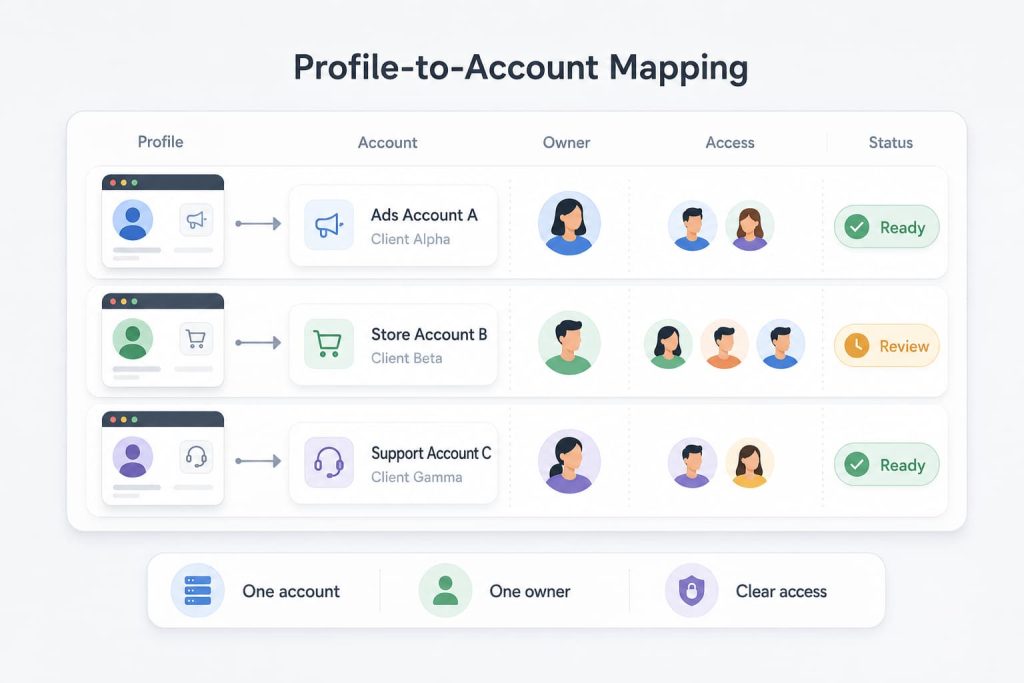
This mapping gives the team a shared language. Instead of asking which browser window is safe to use, the operator can identify the account environment directly. Instead of treating a profile as a private workspace, the team can treat it as a managed account workspace.
The practical difference is small but important.
A local profile says:
This browser has a session.
A team account workspace says:
This is the approved environment for this account, and the team knows how it should be used.
Access Rules Prevent Shared-Profile Drift
The next failure mode is shared-profile drift.
At first, one profile is used for one account. Then a teammate borrows it for a quick check. Another person uses it to verify a login. Someone else keeps it open because the session is still active. Over time, the profile no longer has one clear purpose.
That drift makes account handoff risky because nobody can confidently say what changed, who changed it, or whether the browser profile still represents the account it was created for.
A team-ready profile needs simple access rules:
- who can open it
- who can change it
- who can hand it off
- what account it represents
- when the team should create a new profile instead of reusing an old one
These rules do not need to be complicated. They need to be explicit enough that the next operator is not guessing.
What a Managed Profile Workspace Should Support
A managed profile workspace should treat browser profiles as account environments, not as scattered local browser sessions.
That distinction matters when teams need repeatable account handoff, not just more separated windows.
Browser profiles give the account environment a stable container. A shared workspace gives operators a place to assign, continue, and hand off that account context. Together, they turn browser profile management into a team workflow rather than a private habit.
For this workflow, team access rules matter because the team needs to know who can open a profile, who can change it, and who should take responsibility for the next action.
In practice, that means the team can organize profiles around accounts or clients, keep the account context in a shared workspace, and make handoff a workspace action instead of a private message.
For this workflow, the value is specific:
- the right teammate opens the right profile
- the account environment is easier to identify
- access is handled as part of the workspace
- profile usage depends less on private memory
Proxy strategy, fingerprint tuning, AI agents, and headless automation matter in other workflows, but they do not solve a messy team account handoff by themselves. The handoff problem starts with ownership and workspace structure.
A Five-Point Browser Profile Handoff Checklist
Before treating a browser profile as team-ready, use this checklist:
| Checkpoint | What to verify | Pass condition |
|---|---|---|
| Profile-to-account mapping | The profile maps to one account, client, store, region, campaign, or operating role. | Any teammate can identify what account environment the profile represents. |
| Account environment ownership | The team knows who owns the account environment. | One responsible owner is clear before the profile is opened or handed off. |
| Allowed operators | The allowed operators are clear before anyone uses the profile. | The team knows who can open, operate, or take over the profile. |
| Protected settings | The team knows what settings should not be changed casually. | Operators understand which profile, session, access, or environment settings should stay stable. |
| Handoff readiness | A second teammate can continue the work without rebuilding context from chat history. | The next operator can identify the account, owner, allowed access, and next action without guessing. |
If the team cannot pass this checklist, the problem is not only browser separation. It is browser profile management.
The Next Decision
Pick five active account profiles and run the handoff test.
Can the team identify the account, owner, allowed operator, and next action for each profile without asking in chat?
If not, the team has outgrown casual browser profiles. It needs account environments that carry ownership, access rules, and handoff logic with them.
A multi-account browser profile is team-ready only when it supports the team around the account, not just the browser session inside the profile.