
A multi-account team may have 80 browser profiles, 12 proxy pools, three operators, and a few daily tasks that look simple on paper.
Then one account fails.
Nobody is sure whether the issue came from the proxy, the fingerprint profile, the login state, the page flow, the last manual action, or a script that ran too aggressively. One person remembers that this account should only use a certain region. Another person remembers that the profile was paused last week. The proxy dashboard shows one thing, the browser profile name suggests another, and the task notes are buried in a chat thread.
This is the point where multi-account work stops being a profile management problem.
It becomes a workflow management problem.
A fingerprint browser can separate browser environments. That still matters. But once the same team has to repeat, review, debug, and hand off browser tasks across many accounts, separation is only the starting layer. The more important question becomes whether the work around each profile is understandable, repeatable, and recoverable.
That is why multi-account teams increasingly need a browser automation workspace, not just a browser profile launcher.
One Profile Per Account Is Only the Starting Point
Profile isolation is still the foundation.
Each account needs its own session state, cookies, local storage, browser fingerprint, proxy configuration, and environment signals. Without that separation, teams can run into mixed sessions, unstable logins, region mismatches, and confusing account behavior.
For this reason, fingerprint browsers became common in multi-account operations. They help teams avoid forcing every account through the same local browser identity.
But a separated profile does not automatically create an organized workflow.
A profile can have the right fingerprint and still have unclear task history. It can use a proxy and still have no obvious reason why that proxy was selected. It can be named after an account, but not show whether the account is active, paused, under review, or waiting for a specific task.
In other words, the profile may be isolated, but the work around it may still be hard to understand.
Teams still need to check proxy and fingerprint consistency, especially when region, language, time zone, IP, and browser identity must line up. But consistency checks only answer whether the environment makes sense. They do not tell the team what happened before, what should happen next, or who should review the result.
That gap is where a browser workspace starts to matter.
The Real Unit of Work Is the Workflow Around the Profile
In early-stage multi-account work, the browser profile feels like the main object.
Open the profile. Use the account. Close the profile.
At a larger scale, that model becomes too thin.
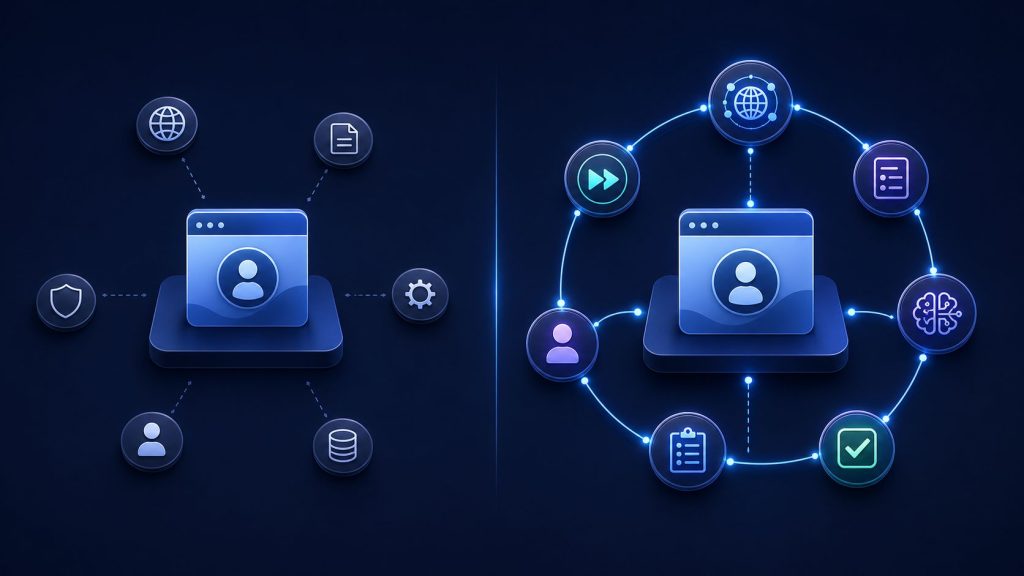
The real unit of work is no longer just the browser profile. It is the repeatable workflow around that profile.
For example, a profile may be used to check account status every morning, verify a regional page, collect a dashboard result, submit a form after human approval, or confirm whether a previous action changed the account state. These are not just browsing sessions. They are operating routines.
If those routines live only in spreadsheets, chat messages, operator memory, and one-off scripts, the team has a fragile system.
A new operator has to ask too many questions before touching anything. A failed run takes too long to diagnose. A proxy may be changed without updating the task instruction. A script may finish, but nobody knows whether the result is safe to trust. An account may be reopened without understanding why it was paused.
This is how multi-account teams lose control without noticing it.
The browser windows may be separated. The operating logic is still scattered.
What a Browser Automation Workspace Adds to Multi-Account Work
A browser automation workspace adds structure around the profile.
It does not remove the need for fingerprint isolation. It makes isolation usable inside a broader operating system.
Instead of treating each profile as a standalone browser window, the workspace connects the profile to its environment, task purpose, automation logic, execution result, and review state.
This is the direction behind the Web4 Browser workspace: bringing browser profiles, proxy configuration, AI Agent actions, reusable Skills, MCP-based workflow connections, headless execution, and team-oriented browser operations into the same working layer.
That matters because multi-account work rarely fails in one isolated place. A task may fail because the proxy changed, the account state changed, the page flow changed, or the operator skipped a condition that was never written down. A useful workspace should make those relationships easier to see.
A good browser automation workspace usually adds five practical layers.
First, it gives each profile more context. A profile should not only be a saved browser identity. It should also carry a purpose, account stage, region, proxy relationship, recent task history, and current operating state.
Second, it keeps proxy and environment mapping close to the browser work. IP region, time zone, language, browser fingerprint, and account use case should not be managed as separate islands. When those signals drift apart, teams waste time guessing instead of fixing.
Third, it turns repeated actions into reusable task logic. Daily checks, dashboard reviews, data collection, status verification, and routine account actions should not depend entirely on manual repetition. If a process is stable enough to repeat, it should be possible to turn it into a workflow, skill, or automation routine.
Fourth, it records what happened. Automation that leaves no trace is hard to trust. Teams need to know whether a task completed, failed, paused, retried, or required human review.
Fifth, it connects visible browser work with headless execution. Some tasks need a human to inspect the page. Others can run in the background. The workspace should support both without forcing the team to split the operation across unrelated tools.
This is the difference between launching browser profiles and operating browser workflows.
Why AI Only Helps After the Workflow Has Structure
AI browser automation is useful, but only when the surrounding workflow is clear enough to guide it.
If the team does not know what a profile is for, which proxy it should use, what state the account is in, or what result counts as success, an AI agent has weak context. It may still take actions, but the team may not know whether those actions were appropriate.
AI does not fix a messy operating model. It amplifies the quality of the structure underneath it.
For AI to help in browser work, the task needs boundaries. The profile context should be clear. The environment should be mapped. The expected outcome should be known. The system should know when to continue, when to stop, when to retry, and when to ask for review.
That is the deeper shift behind the move from fingerprint browsers to AI browsers. It is not just about adding a smarter assistant to a browser. It is about giving the browser enough workflow context to act on behalf of the team without turning every exception into guesswork.
The article on when a fingerprint browser becomes an AI browser explains this product-level change in more detail. In day-to-day operations, the practical lesson is simple: AI becomes much more useful when the browser already understands the work structure around the account.
Without structure, AI creates motion.
With structure, AI can create controlled execution.
Where Traditional Browser Automation Starts to Break
Traditional browser automation is still valuable.
If the page is stable, the selectors are predictable, the login state is consistent, and the task always follows the same path, a fixed script may be enough.
Many multi-account workflows are not that clean.
Different accounts may see different layouts. Different regions may trigger different content. Some profiles may already be logged in, while others may show verification. A page may load differently through one proxy pool than another. A task may need to pause before submitting a form because a human must confirm what is on the screen.
A rigid script does not handle these situations well unless the team keeps adding exceptions. Over time, the script becomes harder to maintain than the task itself.
This is where the difference between an agentic browser and traditional browser becomes practical. A traditional script follows a fixed route. An agentic browser system is expected to work with more context, handle variation more gracefully, and support a mix of automation and human review.
That does not mean every task should be fully autonomous.
The better model is layered execution.
Use fixed automation where the flow is stable. Use AI-assisted execution where the page or account state may vary. Use manual review where judgment matters. Keep all three connected inside the same browser workspace so the team does not lose context when switching modes.
The Team Benefit Is Control, Not Only Speed
Automation is often sold as a way to move faster.
For multi-account teams, speed is only one benefit. Sometimes it is not even the most important one.
The bigger benefit is control.
A browser automation workspace reduces repeated explanation. Operators can see what a profile is for instead of asking someone in chat. They can see whether a task has already been run instead of repeating it. They can review failure logs instead of guessing from memory.
It also makes handoff safer.
If one operator stops working on a group of accounts, another person should be able to continue without reconstructing the whole story from screenshots, spreadsheets, and half-remembered instructions. The workspace should preserve enough context for the next person to understand what is safe to do.
This matters even more when headless automation enters the workflow.
A headless task that runs quickly but leaves no readable trail can create uncertainty. A slower task with clear state, logs, and review points may be safer for the team. The goal is not only to remove manual work. The goal is to make repeated work easier to operate without losing visibility.
Speed helps.
Control makes speed usable.
When a Browser Automation Workspace Becomes Worth It
A browser automation workspace becomes worth it when the team spends too much time managing the work around the browser instead of doing the work itself.
Common signals include:
- The same browser tasks are repeated every day
- Multiple people work on the same account group
- Profile and proxy mappings need frequent explanation
- Some tasks can run headless, but the team still needs review logs
- Failed runs take too long to diagnose
- Fixed scripts require too many exceptions
- Account states differ enough that one rigid workflow is not safe
- Operators need a cleaner way to pause, resume, or hand off tasks
These signs do not only mean the team needs more profiles.
They mean the team needs a stronger browser operations layer.
The article on when teams outgrow a basic fingerprint browser focuses on the pressure that pushes teams beyond simple profile isolation. This article looks at the next operating question: once profile isolation is no longer enough, what kind of workspace helps the team run browser work safely?
The answer is not unlimited automation.
The better answer is structured automation with review, logs, profile context, proxy mapping, and manual override.
What to Look For in an AI Browser Automation Workspace
A useful AI browser automation workspace should combine identity control with execution control.
It should support isolated browser profiles, because account separation still matters. It should support proxy management, because browser identity and network identity need to work together. It should let teams define reusable workflows or skills, because repeated actions should not depend on memory alone.
It should also support AI Agent execution for tasks that need flexible handling, and headless automation for tasks that are stable enough to run without a visible browser. Just as importantly, it should leave behind task states, logs, and review points so the team can understand what happened after execution.
For team operations, visibility is not optional.
A workspace should help operators answer basic questions quickly:
What is this profile used for?
Which proxy and region does it belong to?
What task was last run?
Did the task finish, pause, fail, or need review?
Can the next operator safely continue?
Web4 Browser is designed around this kind of operating model. Instead of treating fingerprint profiles, proxies, AI actions, Skills, MCP workflows, and headless execution as separate pieces, it brings them into one browser workspace for multi-account work.
That is the product direction that matters: not just opening another isolated browser, but making the work around that browser easier to execute, inspect, and recover.
Conclusion
Multi-account teams do not only need more browser profiles.
They need a workspace that can carry the operating context around those profiles: account identity, proxy environment, task logic, automation flow, execution result, failure reason, and human review.
A fingerprint browser solves the first problem: separation.
A browser automation workspace solves the larger problem: operation.
As teams scale, the hard part is not opening another profile. It is keeping browser work understandable across many accounts, proxies, tasks, operators, and exceptions.
The future of multi-account work is not simply more profiles. It is a browser workspace that can understand the task, execute the routine, record the result, and leave enough context for the next person or agent to continue safely.