
A multi-account workflow can look broken even when the browser, the proxy, and the automation tool are all working.
The profile opens.
The page loads.
The AI agent follows the instruction.
The headless task starts at the expected time.
Then the result becomes messy.
One account asks for verification. Another account is already logged out. A third account loads a different regional page. One profile was handled by a teammate yesterday. Another profile still carries a proxy assignment that no longer matches the account’s expected location.
Nothing obvious is broken at the browser level.
The real problem is that automation is acting without enough account context.
For multi-account teams, browser automation is not just about repeating actions. It is about knowing which account is being operated, what state it is in, which environment belongs to it, what happened last time, and whether the next action should continue.
Without that context, automation may become faster, but it does not become safer.
Automation Needs More Than a Browser Window
Basic browser automation usually starts from a simple model.
Open a browser.
Visit a page.
Click a button.
Fill a form.
Read the result.
Close the session.
That model works when every session is expected to behave the same way. It is useful for stable tests, internal tools, simple data collection, and repetitive browser tasks with a predictable path.
Multi-account work is not that clean.
Each profile carries a different account history. One account may be new. Another may be warmed up. Another may have failed yesterday. One account may be safe for a background check. Another may need a human operator to review a warning screen before the workflow continues.
The browser window gives automation access to the page.
Account context tells automation what that access means.
That difference matters. A browser can be open, logged in, and technically usable, while still being the wrong account for the current task. A proxy can be connected, while still being wrong for the expected region. A task can be executable, while still being unsafe to run twice.
For teams already thinking beyond simple profile isolation, this is where the broader idea of a browser automation workspace becomes important. The point is not only to launch profiles, but to keep profile identity, proxy mapping, AI actions, workflow rules, logs, and review states close enough for the team to operate them together.
What Account Context Actually Means
Account context is the operational memory around a browser profile.
It is not just the username or the profile name. It includes the practical details that decide whether automation should continue, pause, retry, or ask for review.
In a multi-account workflow, account context usually includes:
- profile identity
- login state
- cookies and session data
- proxy assignment
- expected region
- language and timezone expectations
- task status
- last result
- failure history
- review rules
- operator handoff notes
These details may sound small, but they decide whether automation is controlled or blind.
A profile may be isolated correctly, but still have unclear task history. A proxy may be active, but still not match the account’s expected operating region. A workflow may be reusable, but still unsafe for an account that is paused, under review, or already completed.
This is why account context sits between profile isolation and automation.
Profile isolation answers one question:
Is this account separated from other accounts?
Account context answers a different question:
Is this account ready for this action now?
Both questions matter. The earlier article on validating proxy and fingerprint consistency focuses on whether browser identity, proxy region, and environment signals line up. This article looks at the next layer: once the environment is technically consistent, how does automation know what the account is supposed to do?
Scripts Break When They Treat Account States as Page Errors
Traditional scripts are good at repeatable paths.
They are weaker when the path changes for a reason the script does not understand.
A script may expect a dashboard, but one account shows a login page. It may expect a normal result screen, but another account sees a verification prompt. It may expect the same interface across all profiles, but regional content changes the page structure. It may expect the task to be available, but that account already completed it yesterday.
From the script’s point of view, the page failed.
From an operator’s point of view, the account is simply in a different state.
That is where many automation problems are misread.
The team may blame selectors.
They may blame the proxy.
They may blame the fingerprint profile.
They may rewrite the script too quickly.
Sometimes those causes are real. But in many multi-account workflows, the deeper issue is that the automation assumes every account belongs on the same path at the same time.
A script can follow steps.
It cannot understand account readiness unless that context is part of the workflow.
This is one reason teams eventually move beyond a basic fingerprint browser. As explained in When Multi-Account Teams Outgrow a Basic Fingerprint Browser, profile separation is still important, but growing teams also need repeatability, visibility, and control around the work that happens inside each profile.
AI Agents Still Need Operating Boundaries
AI agents make browser automation more flexible.
They can read page content, adapt to layout changes, follow instructions, and handle workflows that would be difficult to maintain with rigid scripts alone. This is why AI browser automation is becoming more useful for teams that run repeated browser tasks across many accounts.
But AI does not remove the need for boundaries.
It increases the need for them.
A rigid script may stop when the page changes. An AI agent may keep going because it can interpret the screen and find another path forward. That flexibility is useful, but it can also create risk if the agent does not know the account context.
The agent may retry a failed login when the safer choice is to pause.
It may continue through a verification screen that should be reviewed.
It may treat a regional mismatch as a normal page difference.
It may complete a task twice because it does not know the account history.
It may return a result that looks successful but is not trustworthy.
The better question is not only:
Can the AI agent complete this action?
The better question is:
Should this account continue right now?
That second question depends on context.
This also connects to the product shift described in What Changes When a Fingerprint Browser Becomes an AI Browser. The real change is not just adding an AI assistant to a browser. The more important shift is giving the browser enough workflow structure to help with repeated account work without turning every exception into guesswork.
Headless Automation Needs More Context, Not Less
Headless automation is useful because it can run browser tasks without a visible browser window.
Chrome’s own documentation describes headless mode as a way to run the browser in an unattended environment without visible UI, which makes it useful for automated browser work, testing, and background execution. The same idea is powerful for multi-account teams when tasks are stable enough to run without constant human attention.
But headless automation also hides problems faster.
When a visible browser behaves strangely, an operator may notice. When a headless workflow behaves strangely, the team may only discover the issue later: wrong status, duplicated actions, mismatched proxy use, failed account state, or missing review evidence.
The issue is not headless automation itself.
The issue is blind execution.
Before a team runs browser work in the background, the workflow needs clear account-aware rules.
Which account states are safe for headless execution?
Which warning screens should stop the run?
Which proxy mismatch should block the task?
Which results must be logged?
Which failures should be retried?
Which failures should be escalated?
If those rules are missing, headless automation may save time on the surface while increasing risk underneath.
This is where account context becomes even more important. A visible task can sometimes rely on human attention. A headless task needs the workflow itself to know when to continue and when to stop.
Browser Control Is Not the Same as Workflow Control
Browser automation tools can control a browser at a technical level.
The Chrome DevTools Protocol, for example, allows tools to instrument, inspect, debug, and profile Chromium-based browsers. It is one of the technical foundations behind many forms of browser automation and debugging.
But browser control is not the same as workflow control.
A system may be able to open a tab, inspect a page, click an element, capture a screenshot, and read a network response. Those are important capabilities. They make automation possible.
They do not automatically answer the operational questions that multi-account teams face every day.
Is this the correct profile?
Is this the correct proxy?
Is this task already done?
Was this account paused yesterday?
Did the last run fail for the same reason?
Should the AI agent continue?
Should this case go back to a human operator?
These questions do not belong only to the page. They belong to the account workflow around the page.
That is why the difference between a traditional browser and a more agentic browser is not only about whether automation exists. As discussed in Agentic Browser vs Traditional Browser, the deeper difference is control: who handles uncertainty when the workflow stops being predictable?
The Missing Layer Is Account-Aware Execution
Many teams already have the pieces.
They have browser profiles.
They have proxies.
They have task lists.
They have scripts.
They have AI tools.
They have team notes.
They have logs.
The problem is that these pieces often live separately.
Profile identity is in one place. Proxy mapping is in another. Task status is in a spreadsheet. Review notes are in chat. Automation logs are stored somewhere else. When something fails, the team has to reconstruct the truth from scattered signals.
That is manageable with a few accounts. It becomes fragile when the team is operating many profiles, several proxy pools, multiple operators, and repeated workflows.
The missing layer is account-aware execution.
This means every browser action should stay connected to the account it belongs to.
The workflow should know which profile is being used, which proxy and region belong to it, which task is allowed to run, what the AI agent did, what happened in headless mode, where the task stopped, and what the next operator should know.
This is the natural continuation of the idea in Why Multi-Account Workflows Need a Browser Automation Workspace. A workspace is not valuable only because it contains many tools. It becomes valuable when those tools preserve context across execution, review, and handoff.
Without that layer, automation produces activity.
With that layer, automation produces traceable work.
A Better Model Is Context-Aware Browser Automation
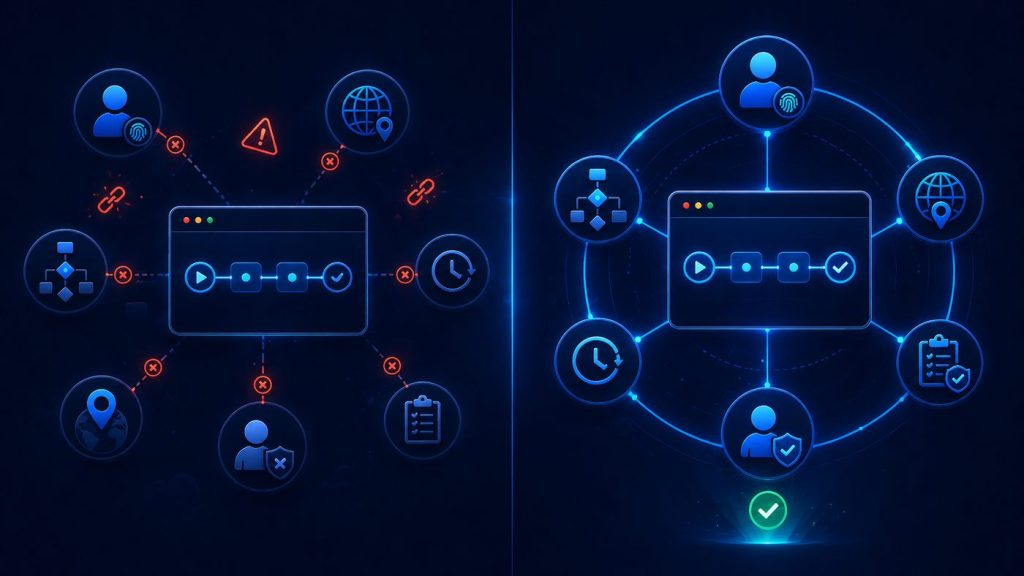
The better model is not simply more automation.
It is context-aware browser automation.
This means the workflow does not only ask whether an action can be performed. It also asks whether the action fits the account, the environment, the task state, and the latest known result.
A context-aware workflow should be able to answer five practical questions.
Who does this profile belong to?
The system should not treat every browser profile as an empty container. Each profile represents an account, a purpose, a status, and a history.
Which environment should this account use?
Proxy, region, timezone, language, and fingerprint environment should remain consistent with the account’s expected operating conditions.
What task is safe to run now?
A workflow should consider recent activity, previous failures, review status, and whether the task has already been completed.
What should be logged?
Automation should leave enough evidence for the team to understand what happened, especially when a task fails, pauses, retries, or stops halfway.
When should automation pause?
Good automation does not push through every uncertain state. It knows when to stop and bring a human operator back into the loop.
That is the real difference between browser control and context-aware execution.
Simple automation asks:
Can this action be done?
Context-aware automation asks:
Is this the right action for this account, in this environment, at this moment?
What This Means for Multi-Account Teams
For multi-account teams, the goal should not be to automate every browser action without exception.
That sounds efficient, but it is not always the safest path.
A better goal is to make repeated browser work easier to execute, easier to review, and easier to recover when something goes wrong.
Account context helps with all three.
It reduces unsafe retries because the workflow knows when an account should stop. It improves handoff because the next operator can see what happened before. It makes AI agents more useful because they operate inside clearer boundaries. It makes headless automation safer because background tasks are tied to state, logs, and stop rules.
Most importantly, it makes failures easier to diagnose.
When automation fails, the team should not have to guess blindly.
Was the profile logged out?
Was the proxy mismatched?
Was the account already completed?
Did the page actually change?
Did the AI agent continue too far?
Was review required?
Did the same issue happen last time?
Without context, every failure looks like a mystery.
With context, a failure becomes part of the workflow record.
That is how browser automation becomes manageable at scale.
Conclusion
Browser automation is moving beyond simple page control.
For multi-account teams, the hard problem is not just opening pages faster or clicking buttons more efficiently. The hard problem is keeping browser actions connected to account identity, proxy environment, task state, history, logs, and human review.
Without account context, automation is only a sequence of actions.
With account context, automation becomes controlled execution.
That is the direction AI browser automation is moving toward: not isolated profiles, not disconnected scripts, and not unrestricted agents, but browser workflows where identity, environment, automation, logs, and review work together.
The future of browser automation is not just autonomous action.
It is accountable action.