Moving away from Multilogin is rarely as simple as exporting a list of accounts and installing another browser.
The real problems appear after the move. A profile loses its login state. A proxy is attached to the wrong account. A teammate cannot tell how the environment was configured. An existing Playwright or Selenium script no longer knows how to launch the correct browser.
Before comparing Multilogin alternatives, define what is failing today and what must still work after the migration.
A direct alternative should first preserve isolated browser profiles, fingerprint settings, proxy assignments, browser data, manual access, and existing automation connections. Team permissions, low-code tools, mobile environments, and AI-assisted tasks matter only after those basics are covered.
Start With the Reason You Want to Switch
Older comparisons often treated price or the lack of a permanent free plan as the main reason to leave Multilogin. That assumption no longer holds without checking the current offer.
Pricing and plan access were checked on July 18, 2026. Multilogin currently offers a permanent free plan with up to five cloud profiles in total, including no more than one mobile profile. All free profiles are automatically deleted if the account remains inactive for seven consecutive days. Pro plans currently start at an equivalent of $7.08 per month when billed annually. Pro 100 includes two team seats, while Business plans add advanced team management and unlimited seats.
Switching may still make sense, but the reason needs to be more specific:
- Profile and proxy assignments are becoming difficult to maintain.
- Another operator cannot take over an account cleanly.
- Existing API limits or connection methods do not fit the internal system.
- Browser data needs to remain primarily on local devices.
- The team needs better cloning, templates, groups, tags, or ownership records.
- Repetitive browser tasks now take more time than creating the environments.
- The plan containing the required API, seats, proxy resources, or automation is too expensive.
The cheapest displayed plan is rarely the correct comparison point. Compare the plan that includes the profile count, team seats, API access, and automation features the real operation requires.
Migration also creates costs outside the subscription:
- Rebuilding profile-to-proxy mappings.
- Recreating sessions or transferring cookies.
- Modifying existing scripts.
- Rebuilding groups and permissions.
- Training operators.
- Running two products during the transition.
- Investigating failures during the first weeks after the move.
A lower monthly fee can still produce a higher total cost when the operating process must be reconstructed.
What a Direct Multilogin Alternative Must Preserve
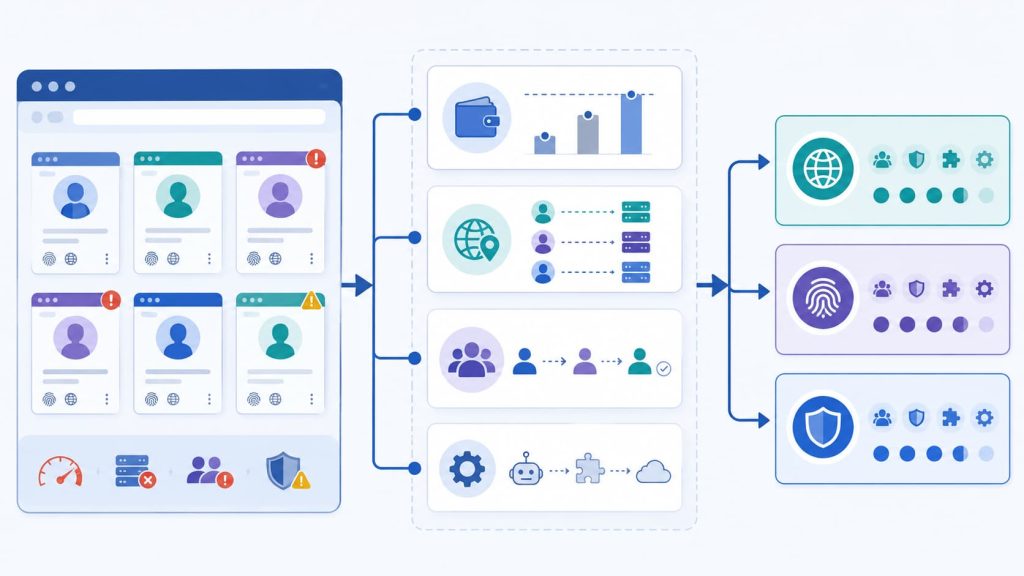
Not every privacy browser, cloud browser, or automation framework is a direct Multilogin alternative.
Before treating a product as a replacement, map it against the parts of the current process that cannot break during migration.
| Requirement | What to verify | Why it matters |
|---|---|---|
| Isolated browser profiles | Cookies, sessions, history, cache, and local storage stay separate | Prevents account data from mixing |
| Fingerprint controls | Browser, operating system, Canvas, WebGL, fonts, language, time zone, and screen settings can be managed | Keeps each environment internally consistent |
| Per-profile proxy binding | Required proxy protocols can be assigned independently | Preserves the account-to-network mapping |
| Persistent browser data | Sessions remain after closing and reopening a profile | Allows long-term profile reuse |
| Bulk organization | Cloning, templates, imports, exports, tags, or groups are available | Reduces repeated setup work |
| Manual browser access | An operator can open and inspect the environment | Allows human takeover when automation fails |
| Team controls | Profiles can be assigned, shared, restricted, or audited | Makes responsibility and handoff clearer |
| Automation access | API, CDP, or supported frameworks can control profiles | Determines whether existing scripts can be retained |
| Plan access | Required capabilities are included in the intended plan | Prevents product-level features from being mistaken for plan access |
Web4 Browser implements this foundation through isolated browser profiles and fingerprint controls. Each environment can maintain separate browser data, fingerprint settings, and proxy assignments while remaining available for normal visual operation.
A product that cannot preserve profiles, proxies, sessions, and existing automation access is not a practical direct replacement, even if its entry price is lower.
Multilogin Alternatives at a Glance
The products below operate in the same broad multi-profile browser market, but they support different ways of managing profiles, proxies, people, and repeated browser work.
This is not a performance ranking. Pricing, profile limits, API quotas, team-seat rules, and promotions can change, so verify the current plan before purchasing.
| Product | Profile and data foundation | Proxy management | Team and bulk work | Automation | Key boundary |
| Web4 Browser | Independent profiles, fingerprint settings, and local data isolation | HTTP, HTTPS, and SOCKS5 proxies with per-profile binding and project organization | Cloning, templates, imports, tags, groups, notes, and team organization | CDP plus AI, Skills, and headless options | Grouping, batch creation, collaboration, and advanced automation vary by plan |
| GoLogin | Persistent profiles, session data, and profile sharing | Per-profile proxy assignment and management | Sharing, cloud launches, and formal team access on paid tiers | REST API | The free plan excludes sharing, API access, bulk creation, cloud launches, and team members |
| AdsPower | Chrome- and Firefox-based profiles, custom fingerprints, and synchronized data | Per-profile proxy configuration and connection checks | Batch management, profile sharing, Synchronizer, and permissions | Local API and visual RPA | RPA capacity, team access, and API limits vary by plan |
| Dolphin Anty | Browser profiles, cookies, and cloud-synchronized data | Proxy manager with profile-level assignments | Synchronized actions, scripts, and team access | Local API and DevTools-based automation with Playwright, Puppeteer, and Selenium | Starter is designed for one user; additional team capacity begins on Base and higher tiers |
| Octo Browser | Profiles, tags, folders, templates, and transfers | Proxy creation, assignment, editing, and organization | Access rights, action logs, tasks, and team members | API, CDP, Playwright, Puppeteer, and Selenium | API starts on Base; team members start on Team |
| Incogniton | Isolated profiles, cookies, and browser-data management | Independent proxy configuration for browser profiles | Bulk actions, Synchronizer, transfers, and team permissions | REST API with Selenium and Puppeteer | API starts on Entrepreneur; formal team management starts on Professional |
| MoreLogin | Browser profiles, groups, tags, and fingerprint settings | Profile-level proxy configuration and assignment | Batch actions, role-based profile authorization, and transfers | Local API with Selenium, Puppeteer, and Playwright | Local browser automation runs alongside the desktop application |
| Linken Sphere | Sessions, cloud synchronization, configuration pools, and mobile emulation | Proxy assignment, testing, and organization by session | Team roles, session logs, and backups | Local API | Team management, backups, and API access are concentrated in Pro and Premium |
The proxy column deserves particular attention during migration. “Proxy support” should not be treated as a simple yes-or-no feature.
Check whether the product supports the required protocols, allows independent binding for every profile, preserves proxy assignments after restart, supports bulk import or testing, and lets operators organize proxies by account, region, project, or owner.
A successful connection message is not enough. The assigned proxy still needs to match the intended IP location, time zone, language, DNS behavior, and account context.
Choose by the Workflow You Need to Preserve
Different Multilogin alternatives become relevant depending on which part of the current operation should remain unchanged.
| Main requirement | Products or direction to evaluate first |
| Preserve a familiar profile-centered workflow | GoLogin, Octo Browser, Incogniton, MoreLogin, Linken Sphere |
| Use built-in synchronization or low-code automation | AdsPower, Dolphin Anty |
| Prioritize local API access and detailed team permissions | Octo Browser, MoreLogin, Linken Sphere |
| Extend browser profiles into reusable tasks, logs, and team handoffs | Web4 Browser |
| Manage only a few profiles manually | Compare free and entry-level plans before paying for advanced automation |
These are starting points rather than rankings. The final shortlist still needs to be tested with the same real task.
Keep a Familiar Profile-Based Workflow
Some teams do not want to redesign the way they operate. They want a replacement that behaves much like their current profile manager.
In that case, prioritize session persistence, proxy and cookie migration, profile transfer, team permissions, organizational tools, script compatibility, and whether the desktop application must remain open.
GoLogin keeps a familiar profile-centered structure and adds profile sharing, cloud launches, and REST API access. Its free tier is useful for basic profile testing, while collaboration and automation require a paid plan.
Octo Browser becomes more relevant when detailed permissions and programmatic control matter. Its API can manage profiles, proxies, tags, folders, transfers, and team access.
Incogniton offers a gradual move from individual profile management to automation and formal team access. Higher plans add API access, browser-framework integration, transfers, Synchronizer, and team permissions.
MoreLogin is worth considering when browser automation needs to run locally alongside the desktop application. Its Local API supports Selenium, Puppeteer, and Playwright, while team roles can limit access by profile or group.
Linken Sphere organizes work around Sessions and Desktops. Higher tiers add team management, session logs, backups, and Local API access.
The choice is not about which interface looks most familiar. It is about whether profile ownership, proxy assignments, session data, permissions, and scripts can move without rebuilding the operation.
Use Built-In Bulk or Low-Code Automation
Some operations want to reduce repetitive work without developing every step from code.
AdsPower and Dolphin Anty are relevant here because automation is visible inside the product rather than existing only as an external API.
AdsPower combines batch profile management with a multi-window Synchronizer, visual RPA, and a Local API. RPA capacity, team access, and API request limits vary by plan.
Dolphin Anty supports synchronized operations, automation scenarios, proxy tools, a Local API, and DevTools-based connections for Playwright, Puppeteer, and Selenium. Starter remains focused on a single user, while team capacity begins on higher tiers.
These products are worth testing when repetitive actions span many profiles but do not justify a fully custom automation platform.
The practical questions are concrete:
- Can an operator see where a run stopped?
- Can another person edit the process?
- What happens when a page loads slowly?
- Can the process handle a changed element?
- Is a verification prompt visible before the next action runs?
A visual builder may reduce initial scripting work while still creating maintenance work later.
Extend Profiles Into Tasks and Team Handoffs
Some teams already have stable profiles, proxy assignments, and session storage. Their bottleneck appears after the environments are ready.
The recurring work may involve opening the correct profiles, checking the same pages, entering structured information, extracting results, reviewing exceptions, and passing unfinished work to another operator.
API access alone does not solve all of these problems.
Web4 Browser qualifies as a Multilogin alternative before its AI features are considered. Its base layer includes independent browser profiles, configurable fingerprint parameters, HTTP, HTTPS and SOCKS5 proxies, separate local profile data, manual visual operation, and CDP connections for Selenium, Puppeteer, and Playwright.
AI is not required to create, configure, organize, or manually operate a Web4 Browser profile.
Reusable Skills, Agents, and MCP connections can combine browser actions with execution logs, exception details, and result summaries.
If scheduled or unattended execution is part of the migration requirement, check whether the same browser profile remains available for background runs and visual takeover. Web4 Browser documents this approach through scheduled and headless browser tasks.
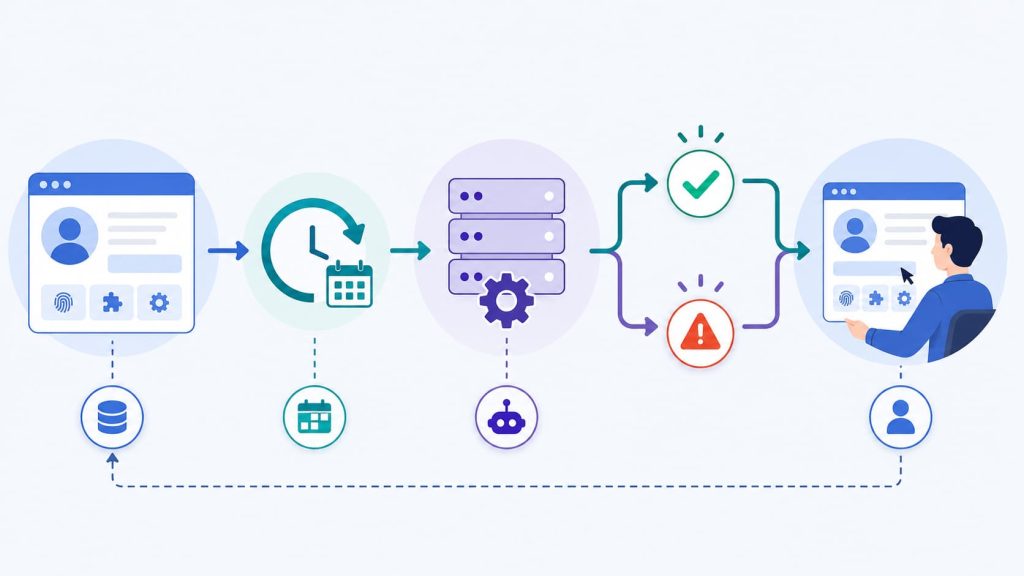
These capabilities are most relevant when:
- Many persistent profiles need to be organized by project, region, platform, or owner.
- Manual and scripted work use the same environments.
- Repeated page checks consume operator time.
- Failed runs need logs and exception details before someone decides what to do next.
- A working browser procedure should be reused by other team members.
They matter less when one person manages only a few profiles manually.
Plan boundaries should still be checked before migration. Grouping, batch creation, team collaboration, AI tools, and broader automation access are not included at every subscription level.
Test the Shortlist With One Real Workflow
Official product information can confirm that a feature exists. It cannot show whether the product fits a specific team.
Before moving important accounts, test each finalist with the same non-critical workflow.
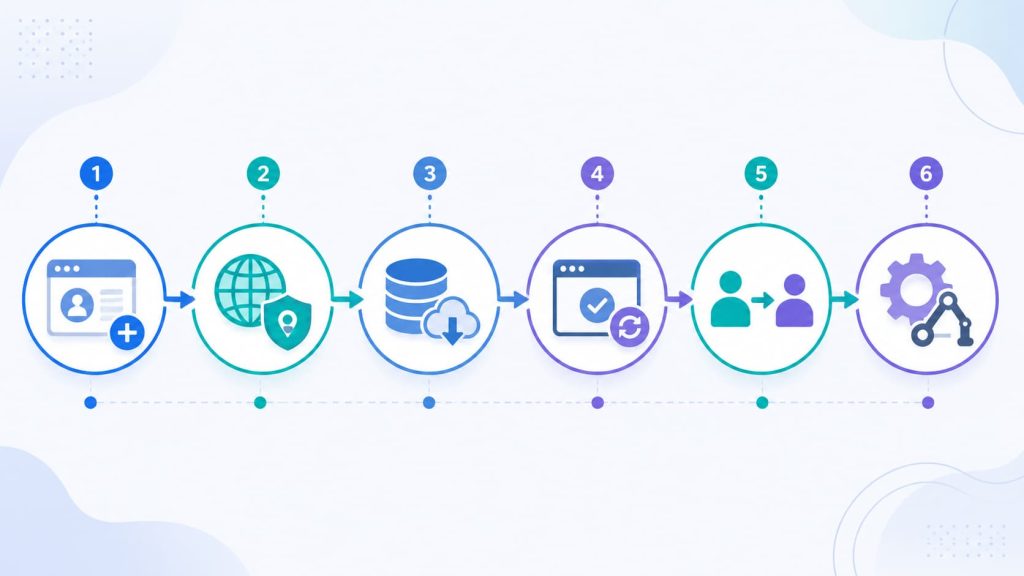
1. Create and Configure One Profile
Set the browser version, operating system, language, time zone, resolution, and the fingerprint parameters required by the task.
2. Bind a Test Proxy
Check the actual outbound IP, region, DNS behavior, time zone, and browser language rather than trusting only a successful connection message.
3. Create Session Data
Sign in to a test account and store a small amount of cookie and local-storage data.
4. Restart the Profile
Confirm that the login state, proxy assignment, fingerprint settings, tags, groups, and notes remain available.
5. Hand the Profile to Another Operator
Check what the second person can view, edit, launch, transfer, clone, or delete. Also confirm what happens to profile ownership when a member leaves.
6. Connect an Existing Script and Check the Plan
Use Selenium, Puppeteer, Playwright, or the supported API to perform one simple page action. Then confirm that every capability used in the test is included in the plan the team intends to purchase.
When the final two candidates are Web4 Browser and Multilogin, compare their profile management, proxy organization, automation access, and team workflows before moving production accounts.
Keep a candidate only if the profile survives restart, preserves its proxy and session mapping, supports the required handoff, and still works with the team’s existing automation path.
Creating the profile itself is only the first step.