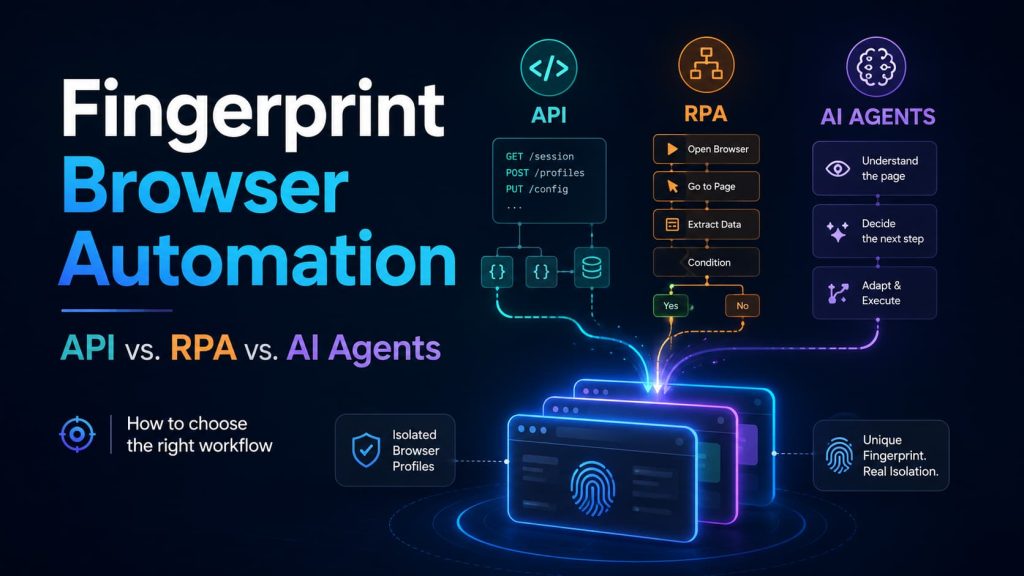
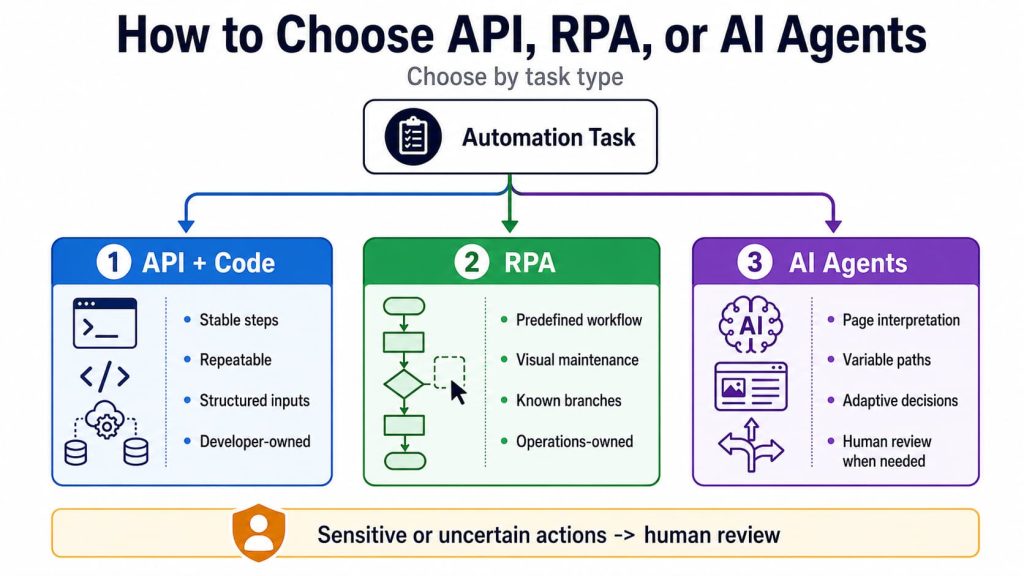
Fingerprint Browser Automation should be chosen based on the type of task, who will maintain it, and how much variation the workflow must handle:
- Use API and code for stable, repeatable workflows.
- Use RPA when operations teams need to build and maintain predefined steps visually.
- Use AI agents when the next action depends on interpreting page content.
In practice, the three approaches can work together. Keep routine steps deterministic, use AI only where interpretation is necessary, and require human review for uncertain or sensitive actions.
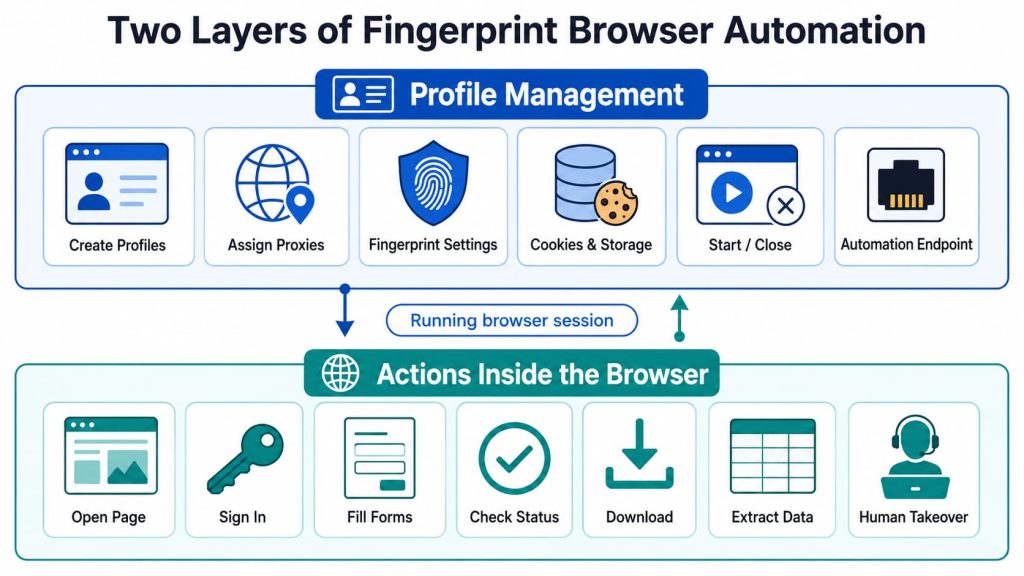
Fingerprint Browser Automation Has Two Separate Layers
The first layer manages the browser environment. It may include:
- Creating or cloning browser profiles
- Assigning proxies
- Configuring fingerprint parameters
- Starting and closing profiles
- Preserving cookies and local storage
- Grouping profiles by project, region, or operator
- Retrieving an automation endpoint
- Recording which profile handled a task
The second layer performs actions inside the running browser:
- Opening a page
- Signing in
- Filling out a form
- Reading account status
- Downloading a report
- Extracting structured data
- Submitting an action
- Handing the browser to an operator
This distinction matters because a profile API does not necessarily perform page actions itself.
In many fingerprint browsers, the product API manages the profile lifecycle. It starts the browser and returns a CDP, WebSocket, or similar connection endpoint. Playwright, Puppeteer, Selenium, or another browser-control layer then performs page actions through the connection method supported by that product.
A product may have a strong profile API without offering a visual workflow builder. Another may provide RPA templates but limited programmatic control. A third may add an AI interface that calls existing tools without independently understanding the webpage.
A product page that says “automation supported” has not yet told you which of these capabilities is actually available.
API vs. RPA vs. AI Agents
| Decision factor | API and code automation | RPA | AI agent |
|---|---|---|---|
| Typical task fit | Stable and clearly defined | Repeatable workflow with known branches | Variable path requiring interpretation |
| Typical builder | Developer | Operations or automation specialist | Business and technical teams together |
| Execution behavior | Deterministic when inputs and page states are known | Rule-based across predefined nodes and branches | May vary as the model interprets the page |
| Response to page changes | Update code or selectors | Update workflow nodes or branches | Reinterpret the changed page |
| Debugging | Logs, traces, and breakpoints | Node debugging and run records | Tool logs, screenshots, and decision records |
| Typical operating pattern | High-volume, stable tasks | Repeated processes maintained visually | Variable-path tasks where interpretation justifies model cost |
| Main cost | Development and code maintenance | Workflow design and node maintenance | Model use, validation, and governance |
| Human handoff | Must be designed separately | Often easier in a visible workflow | Needs explicit approval or takeover design for uncertain or sensitive actions |
| Main reason to choose | Control and repeatability | Visual maintenance and team reuse | Page understanding and adaptive decisions |
The choice depends mainly on three questions:
- How predictable is the task?
- Who will maintain the automation?
- What should happen when the page no longer matches the expected path?
Choose API and Code Automation for Deterministic Work
API and code automation are usually the clearest default when a task is stable, runs at volume, and requires reproducible logs.
A typical workflow may use the fingerprint browser API to:
- Create or retrieve a profile
- Assign its proxy
- Start the browser
- Obtain its debugging address
- Close the profile after execution
Playwright, Puppeteer, or Selenium then connects to the running browser and performs the actions inside it.
This approach fits scheduled account checks, structured data collection, report downloads, profile creation, and other tasks whose inputs and expected results are already known.
A status-checking process, for example, might:
- Retrieve the assigned profile.
- Start the browser.
- Connect through CDP.
- Open the target page.
- Check for a known status.
- Save the result.
- Close the browser.
The workflow is explicit. When it fails, the team can identify the failed request, selector, step, or returned state.
API and code automation fit tasks where:
- The same sequence runs repeatedly.
- Inputs and outputs are structured.
- Execution must connect to databases, queues, or monitoring.
- Retries follow defined rules.
- Errors must be reproduced precisely.
- Many profiles must complete the same task.
- Developers already maintain the surrounding system.
The trade-off is maintenance.
APIs do not eliminate maintenance; they move it into code. A changed page may require new selectors. A changed login flow may require another branch. Long-running systems also need authentication, scheduling, logging, retries, and state recovery.
Choose this approach when deterministic execution is worth the engineering effort.
Choose RPA When a Stable Process Must Be Maintained Visually
RPA is often reduced to recorded mouse movements, but mature browser RPA can include:
- Visual workflow nodes
- Reusable variables
- Conditions and branches
- Error handling
- Node-level testing
- Scheduled execution
- Task templates
- Run histories
AdsPower positions RPA Plus around visual workflow editing, reusable tasks, node debugging, exception handling, and execution records. These are official product claims rather than proof that every workflow will perform equally well, but they demonstrate that browser RPA can extend beyond simple action recording.
MoreLogin lists RPA for both browser and cloud-phone workflows in its developer center. Its current detailed RPA documentation, however, focuses on cloud phones, so the depth of its desktop browser-profile RPA should be verified separately.
That distinction matters when comparing products within the broader Fingerprint Browser Automation category.
RPA is usually a better fit when:
- Operations staff maintain the process.
- The page flow is relatively stable.
- Workflow steps need to remain visible.
- The task includes known branches.
- Several team members reuse the same process.
- Managers need run records without reading code.
- Process changes happen faster than developers can update scripts.
Consider an operations team that opens a profile, checks several dashboard fields, downloads a report, and updates an internal system.
The work is repetitive rather than interpretive.
A visual workflow allows the team to review the sequence and adjust a field mapping or branch without modifying a software project. When the task fails, node-level records can reveal whether the problem occurred during login, navigation, extraction, or export.
RPA still follows predefined logic
A visual workflow does not automatically understand every new page.
It can handle branches that someone has already defined. If a website introduces an unfamiliar confirmation screen, the process may stop, trigger a generic exception path, or continue incorrectly.
The relevant question is not whether RPA is more advanced than an API. It is whether a visual workflow is easier for the people responsible for building, reviewing, and maintaining the process.
Check the depth of the RPA implementation
Products may use “RPA” to describe very different capabilities:
- Basic action recording
- Saved automation templates
- Visual node editing
- Conditional branches
- Reusable variables
- Task scheduling
- Execution logs
- Team-level workflow management
A successful demo is not enough. Check whether the product can identify the failed node, preserve run history, reuse variables, and let an operator continue from a known state.
Choose an AI Agent When the Next Step Depends on Meaning
An AI agent becomes useful when the goal is clear but the page path cannot be specified completely in advance.
Possible tasks include:
- Locating the relevant record across different layouts
- Classifying page content before choosing an action
- Extracting the same business result from varying pages
- Deciding which saved workflow should run next
- Responding to a limited set of unfamiliar page states
- Requesting approval when the result is uncertain
NSTBrowser’s official product materials position Agent Skills as reusable modules for page-aware navigation, interaction, and data extraction. GoLogin’s Browser Use review describes another approach in which an AI agent operates a CDP-controlled browser through natural-language instructions.
These descriptions explain how the products are positioned. They do not prove that an agent will handle every page change reliably.
The defining difference is that the agent interprets the current state before selecting an action.
Web4 Browser’s AI Agent browser automation follows the same broad shift from fixed instructions toward goal-based browser tasks. It is designed to accept a task description, work through browser actions, and return page status, results, and execution information.
The useful question is not whether a product uses the label “AI Agent.” It is how far the system moves from generating instructions to making and recording decisions during execution.
Four Capabilities Are Commonly Described as AI Automation
Not every product that mentions AI, MCP, or agents offers the same level of autonomy.
1. AI-generated browser scripts
The user describes a task, and AI produces Playwright, Puppeteer, or Selenium code.
Once generated, the script remains deterministic. AI assisted with development, but it is not independently controlling the browser during every run.
2. Natural-language tool control
The user writes a request such as:
Open these profiles and check their current status.
An AI model converts the request into predefined API or tool calls.
AdsPower’s MCP implementation follows this pattern by connecting AI tools to supported Local API operations such as creating, starting, editing, or closing profiles.
This can reduce the need to write calls manually, but the available actions remain bounded by the tools exposed to the model.
3. Page-aware agent execution
The agent reads the current page, identifies relevant controls, and decides which action to take.
The path may differ between runs because the decision depends on the current page state rather than a fixed sequence.
4. Governed agent workflows
A production-oriented agent should do more than understand the page. It may also need to:
- Call only approved tools
- Record its actions
- Preserve screenshots and results
- Stop at restricted operations
- Report uncertainty
- Request human approval
- Hand over the current browser session
This level matters when a workflow affects valuable accounts, sensitive data, or irreversible actions.
MCP Support Does Not Automatically Mean an Autonomous Agent
MCP can connect an AI model to browser and profile-management tools. Its presence alone does not show how much of the task the model controls.
An MCP-enabled fingerprint browser may expose tools such as:
- Create a profile
- Start a profile
- Assign a proxy
- Open a URL
- Retrieve profile information
- Run a saved workflow
An AI assistant can choose and call these tools. That may create a more convenient command interface, but the underlying workflow can remain deterministic.
Before treating MCP support as full AI-agent automation, check:
- Can the system inspect the actual webpage?
- Can it choose between different page actions?
- Does it record which tools were called?
- Can it preserve the basis for a decision?
- Can it detect uncertainty?
- Can it pause for approval?
- Can an operator continue from the same browser state?
- Can roles or task rules restrict sensitive tools?
Without these controls, MCP may improve access to existing automation without replacing the need for defined workflows.
AI Agents Replace Some Maintenance With Different Costs
AI agents can reduce some selector maintenance when page interpretation is reliable, but they introduce other operating costs:
- Model usage
- Execution latency
- Output variability
- Prompt and tool maintenance
- Permission design
- Decision logging
- Result validation
- Human review
The more sensitive the action, the less acceptable it is to let the model guess.
An agent may locate a record, classify a page, or prepare an action. Payments, credential changes, account deletion, regulated publishing, and other high-risk operations should use explicit approval or deterministic controls.
API, RPA, and AI Agents Can Share the Same Workflow
The three approaches do not have to compete for every step.
A practical design keeps predictable operations deterministic and introduces AI only where interpretation creates enough value to justify its cost and uncertainty.
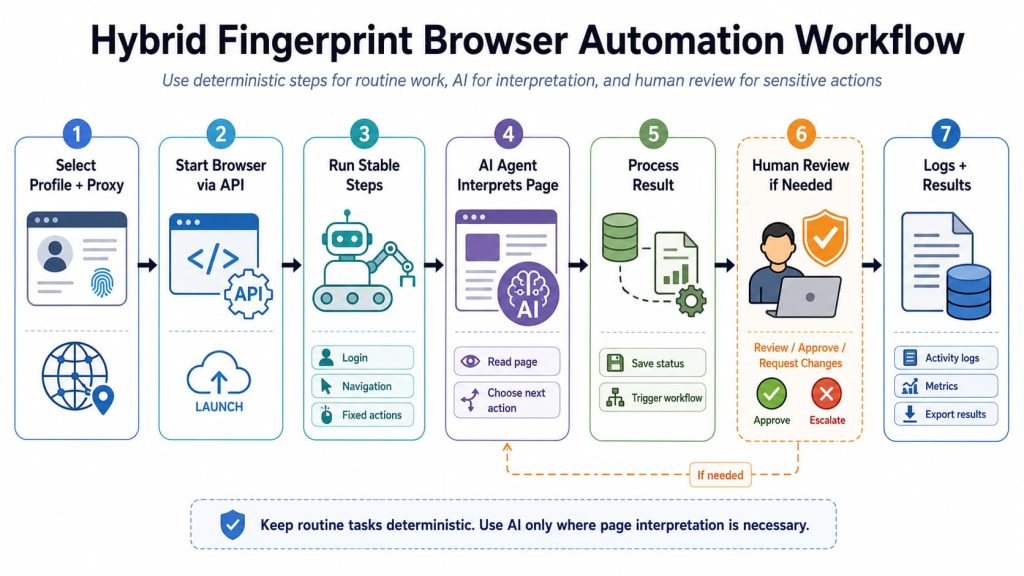
A hybrid process may work like this:
- An API selects the correct profile and proxy.
- A script starts the browser and opens the target system.
- Code or RPA handles login and other stable steps.
- An AI agent interprets a variable page.
- A predefined workflow processes the resulting status.
- A person approves any sensitive action.
- Logs and screenshots remain attached to the task record.
This reduces unnecessary model use without forcing variable page states into an ever-growing collection of selectors and exception branches.
Web4 Browser is relevant when a team wants to retain isolated profiles and CDP-based browser control while gradually adding AI-assisted tasks. Its Skills and MCP workflows connect reusable browser actions, external tools, execution logs, and agent orchestration.
Combined with the AI agent workflow described earlier, repetitive tasks can run headlessly and return to a visible browser when review is required.
This is not the same as a mature drag-and-drop RPA editor. Teams that require visual RPA as their primary interface should verify that capability separately rather than assuming that Skills, MCP, or AI agent features provide an equivalent workflow-building experience.
Three Common Selection Scenarios
Creating and starting large groups of profiles
Use API and code automation.
The profile settings, proxies, tags, and expected results are structured. The task should remain deterministic and auditable.
Repeating the same browser process every day
Use API or RPA.
Choose code when developers own the process and it must connect to internal systems. Choose RPA when operations staff need to review and modify the workflow visually.
Handling variable pages with occasional human review
Use a hybrid workflow.
Keep profile selection, login, navigation, and result storage deterministic. Let an agent interpret only the variable part, then preserve the same session when a person must review the result.
What to Check Before Choosing a Fingerprint Browser
A product page may list API, RPA, MCP, and AI agent support without showing whether those capabilities belong to the same plan or solve the same task.
Profile and browser control
- Can profiles be created, edited, started, and closed programmatically?
- Can proxy and fingerprint settings be managed through the same interface?
- Are cookies and local browser data preserved after interruption?
- Can Playwright, Puppeteer, or Selenium connect to an existing profile?
- Are visible and headless modes both available?
RPA depth
- Is there a visual workflow editor or only recorded actions?
- Are variables, conditions, and reusable tasks supported?
- Can individual nodes be tested?
- Are execution records retained?
- Can a failed run stop or resume from a known point?
AI-agent depth
- Does AI only generate code?
- Does it call fixed tools through natural language?
- Can it inspect the webpage itself?
- Can it choose actions based on page content?
- Are tool calls and results recorded?
- Can it request approval or hand control to a person?
Team and plan boundaries
- Who can create or modify automations?
- Can another member understand what happened during the previous run?
- Which plan includes API, RPA, AI, and headless execution?
- Are concurrent runs or AI tasks limited?
Feature availability and plan availability can change independently. Verify both before treating a successful demo as proof that the complete production workflow is supported.
Test Every Candidate With the Same Task
Do not compare one product’s API demo with another product’s RPA template and a third product’s AI showcase.
Give every candidate the same task:
Open an existing profile, preserve its login state, visit a target page, identify the current account status, record the result, handle one unexpected page state, and allow a person to take over without opening a new session.
Record:
- Setup time
- Manual steps
- Execution consistency
- Failure location
- Recovery method
- Log quality
- Whether the same profile state was preserved
- Whether an operator could take over
- Whether the required feature was available in the intended plan
If a candidate can preserve the same profile state, report where the task failed, recover through a defined path, and allow an operator to continue in the same visible session, its automation model is suitable for production evaluation.
If it can complete only the ideal demo path, the label—API, RPA, or AI agent—does not yet answer the buying question.