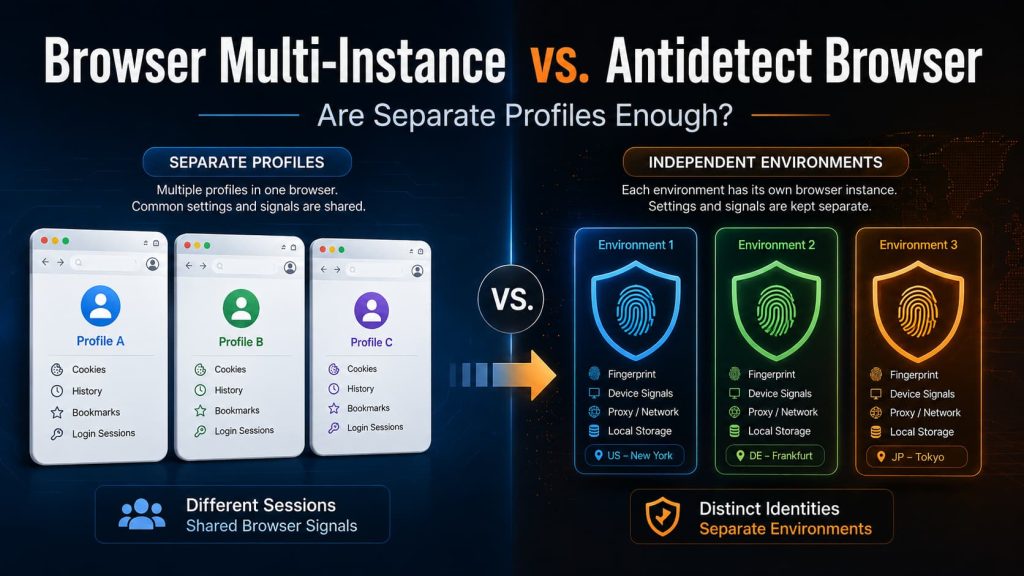
If you only need to keep several accounts logged in at the same time, separate browser profiles can look like a complete solution.
Account A stays in one profile. Account B stays in another. Their cookies, browsing history, saved passwords, and login sessions do not get mixed together. You can switch between them without logging out every time.
For many everyday tasks, that is exactly what you need.
The question becomes more complicated when the accounts need more than separate login data.
A website does not only see cookies. It can also observe information about the browser, operating system, screen, language, timezone, graphics environment, and network connection. Two browser profiles can therefore contain completely different account data while still exposing many of the same underlying device characteristics.
That is the key difference in Browser Multi-Instance vs. Antidetect Browser.
A multi-instance browser mainly separates browser sessions. An antidetect browser is designed for situations where each account also needs a distinct and persistent browser environment.
So the practical question is:
Are separate profiles enough, or does each account need to appear as its own browser environment?
What Does Browser Multi-Instance Mean?
In practice, “browser multi-instance” usually means opening several separate browser sessions or profiles at the same time.
The term is not completely standardized. Depending on the tool, it may refer to:
- several browser windows;
- multiple Chrome profiles;
- separate browser processes;
- containers or profile managers that keep sessions apart.
For this comparison, browser multi-instance means running multiple browser profiles without a dedicated system for creating and maintaining different browser fingerprints or browser identities.
Chrome profiles are an easy example.
Google explains that Chrome profiles can keep bookmarks, history, passwords, and other settings separate. They are useful for separating work and personal browsing or allowing several people to use the same computer.
That is real separation, but mainly at the level of browser data and login state.
In simple terms:
A browser profile answers: “Which cookies, history, and login data belong to this account?”
It does not necessarily answer:
“What browser and device does this website appear to be communicating with?”
That second question is where browser fingerprinting becomes relevant.
What Is a Browser Fingerprint?
When you visit a website, the browser exposes more information than your login cookie.
A site may be able to observe signals such as:
- browser version;
- operating system;
- screen size and resolution;
- language;
- timezone;
- installed fonts;
- graphics capabilities;
- Canvas and WebGL behavior;
- other browser and device characteristics.
MDN describes browser fingerprinting as combining multiple observable characteristics to help distinguish one browser from another.
A simple way to think about the difference is:
A cookie tells a website:
“This is the account that logged in before.”
A browser fingerprint can help the website estimate:
“This browser appears similar to one I have seen before.”
The fingerprint is not one single value. It is a combination of many signals describing the browser environment.
This is why two separate profiles do not automatically appear as two separate devices.
A Browser Profile and a Browser Identity Are Not the Same Thing
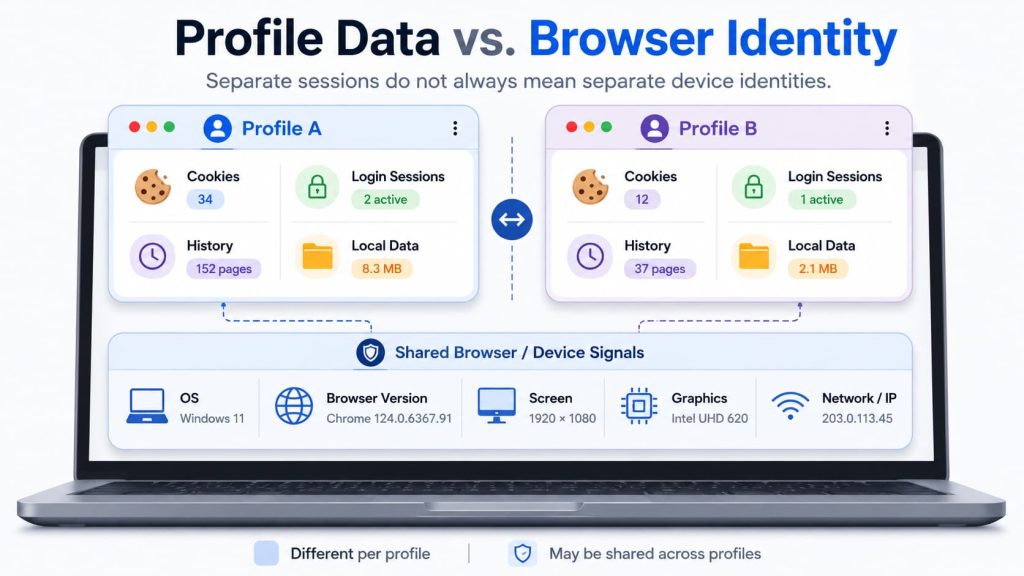
Imagine opening two Chrome profiles on the same laptop.
Profile A contains one account.
Profile B contains another.
Their cookies, histories, and login sessions can be completely separate.
But both profiles may still report the same:
- operating system;
- browser version;
- screen resolution;
- graphics environment;
- system fonts;
- device characteristics;
- public IP address, unless the network route is changed.
From your point of view, they are two separate browser profiles.
From a website’s point of view, many of the signals underneath those profiles may still come from the same computer.
That does not mean Chrome profiles are doing something wrong. They were built to separate users, browser data, and sessions—not to create different device identities.
The important distinction is:
Separate login profiles do not automatically look like separate devices.
Browser Multi-Instance vs. Antidetect Browser at a Glance
| What needs to be separate? | Browser multi-instance | Antidetect browser |
|---|---|---|
| Cookies and login sessions | Usually | Yes |
| History and local browser data | Usually | Yes |
| Saved browser state | Often | Yes |
| Browser and device fingerprint | Usually not the main purpose | Core capability |
| IP or proxy settings for each profile | Depends on the tool | Common capability |
| Fingerprint and profile state across repeated sessions | Depends on the tool | Common design goal |
| Main goal | Keep sessions apart | Keep browser environments apart |
The table is not saying that an antidetect browser is automatically the better choice.
The two approaches solve different levels of the problem.
If you only need separate login state, normal profiles may already solve it.
If each account needs its own browser identity and needs to keep using that environment over repeated sessions, the requirement is different.
What Can Still Be Shared Across Different Profiles?
Two ordinary profiles running on the same computer can have different cookies while still inheriting many properties from the same machine.
For example, both may use the same:
- Windows or macOS version;
- Chrome version;
- display configuration;
- graphics hardware;
- system language and timezone;
- internet connection.
Some of these values can contribute to browser fingerprinting.
So a website may see two different login sessions while still seeing many similarities in the browser and device information behind them.
The difference is easier to understand in plain language:
Profile separation controls which browser data belongs to each account.
Browser fingerprint and identity describe what information the website sees about the browser and device.
What Does an Antidetect Browser Add?
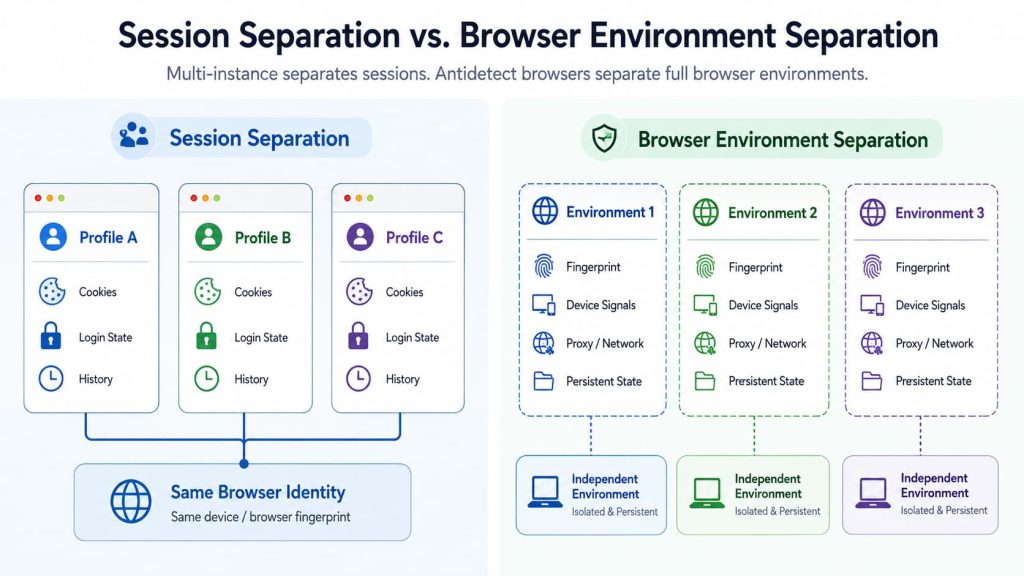
An antidetect browser starts with separate profiles, but adds controls intended to give those profiles distinct browser identities.
Different products implement this differently, so individual features should always be checked rather than assumed.
For example, Multilogin describes each profile as maintaining its own cookies, session data, proxy configuration, and browser fingerprint. Its fingerprint settings include signals such as WebRTC, timezone, geolocation, languages, screen resolution, fonts, WebGL, Canvas, and AudioContext.
GoLogin also describes profiles as having their own browser fingerprint, cookies, session data, proxy context, and extensions.
The category difference can therefore be summarized simply:
Browser multi-instance separates sessions.
An antidetect browser also manages the browser identity behind those sessions.
This does not mean that more editable fingerprint fields automatically produce a better environment. The values still need to make sense together.
Why the Same Profile Also Needs to Stay Consistent
Making Profile A different from Profile B is only part of the job.
The same profile also needs to make sense when you open it again later.
Imagine using an account today from a profile that appears to have one operating system, language, screen setup, and browser configuration.
Tomorrow, the same saved profile suddenly appears with a very different combination of browser and device signals.
It may still be different from your other profiles, but it no longer behaves like the same browser environment it was yesterday.
So a useful antidetect environment has two jobs:
Keep different profiles separate.
And:
Keep the same profile reasonably consistent over time.
This is why browser identity is more than randomly changing fingerprint values. The different signals also need to make sense together.
Web4 Browser takes this a step further by treating the fingerprint, saved profile state, proxy context, and related browser signals as parts of one managed browser environment.
AI is used to reduce some of the manual work involved in building and maintaining that environment, rather than treating every fingerprint setting as an unrelated value.
In this model, the saved browser identity and profile keep the account’s cookies, local data, login state, and browser-facing environment together, while the proxy or network route remains another part of the environment that still needs to be configured appropriately.
The broader principle matters regardless of product:
A useful browser environment should not only be different from other profiles. Its signals should also make sense together and remain sufficiently consistent when the same account returns.
Does Adding a Proxy Make Separate Profiles Independent?
Not by itself.
A proxy changes where the network connection appears to come from. It can give different profiles different public IP addresses.
But a proxy does not automatically change everything the browser reveals about the device.
For example, two profiles can use different proxies while still exposing the same:
- browser version;
- screen resolution;
- operating system;
- graphics environment;
- language;
- other device-related signals.
So this setup:
Profile A + Proxy A
Profile B + Proxy B
does not automatically mean that Profile A and Profile B now appear as two completely different browser environments.
In technical terms, network context and browser identity are different parts of the environment.
Both can matter, but one does not replace the other.
When Is Browser Multi-Instance Enough?
Browser multi-instance is usually enough when the main thing you need to separate is login data.
For example, separate profiles work well when you want to:
- keep several email or SaaS accounts signed in;
- separate work and personal browsing;
- test different user accounts on your own website;
- use different extensions or bookmarks for different tasks;
- avoid mixing cookies between unrelated sessions.
In these situations, the browser is already solving the main problem.
Adding fingerprint management merely because several accounts are involved may introduce complexity without solving anything you actually need.
When Does an Antidetect Browser Become Relevant?
The requirement changes when the answer becomes:
“Each account needs its own browser environment, not just its own login session.”
This becomes relevant when an account needs to return to the same environment repeatedly while remaining separate from other account environments.
You may then need to check whether the browser can maintain:
- separate cookies and local storage;
- a distinct browser fingerprint;
- browser and device signals that make sense together;
- a network configuration associated with the profile;
- a reasonably consistent environment when the profile is closed and reopened.
The important question is not how many fingerprint parameters the product lets you edit.
More settings do not automatically mean a better environment.
If values are changed without considering how they relate to each other, the resulting combination may become less coherent rather than more realistic.
Multilogin’s documentation makes a similar point by recommending compatible defaults instead of randomly changing fingerprint values that may reduce consistency.
A more useful question is:
“Does this profile behave like one coherent browser environment every time I use it?”
How to Tell Which One You Need
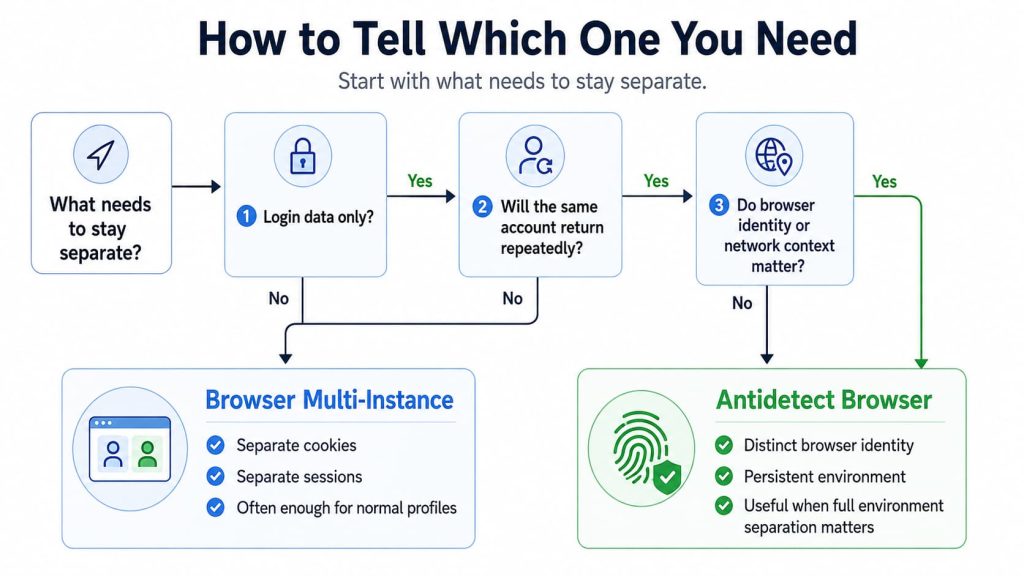
Use these five checks to decide whether separate browser profiles are enough or whether you need an antidetect browser with a persistent browser environment.
What actually needs to be separated?
If you only need different cookies and login sessions, normal browser profiles may already be enough.
Does each account need to appear as a different browser environment?
If the website only needs separate logins, probably not.
If browser and device signals matter to the workflow, profile separation alone does not solve the whole problem.
Will you reopen the same account repeatedly?
If yes, consistency becomes more important.
A completely different browser identity every time is not the same as maintaining one environment for that account.
Does each account use its own proxy or network route?
If yes, check whether the network location and browser environment make sense together.
A proxy is part of the environment, not a substitute for it.
Can you check what the website actually sees?
Do not judge an environment only by what its settings page says.
Open the profile and inspect the browser information that is actually exposed.
That is where the difference between multi-instance browsing and an antidetect browser becomes practical rather than theoretical.
So, Are Separate Profiles Enough?
Sometimes they are.
If your goal is simply to keep cookies from mixing, maintain several logins, or separate browser workspaces, ordinary browser profiles or multi-instance tools are usually the simpler solution.
If each account needs to maintain its own browser identity and persistent environment, an antidetect browser is solving a different problem.
The dividing line is not how many browser windows you can open.
It is what must still remain independent after those windows are open.