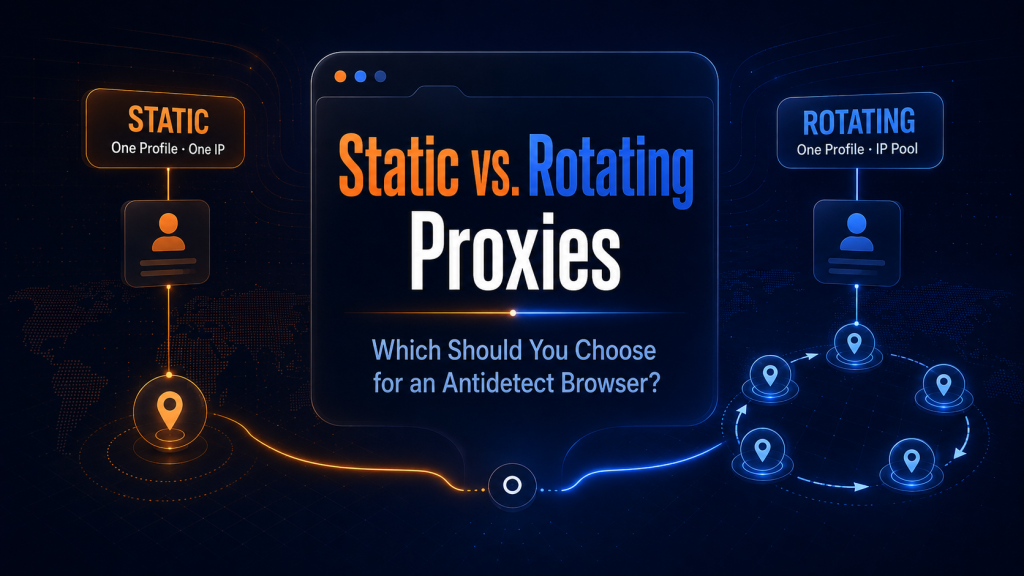
An antidetect browser allows users to create separate profiles with different digital fingerprints and environment settings. However, the browser profile is only one part of the setup. The IP address through which the profile connects to websites is just as important.
Some scenarios require keeping the same IP address for an extended period, while others benefit from regularly switching between different IPs. This raises an important question when configuring browser profiles: should you use static proxies or rotating proxies?
Let’s look at how these two options differ and which tasks each one is best suited for.
Why Proxy Type Matters When Using an Antidetect Browser
Websites analyze more than just a browser fingerprint. They can also see network-related information such as the IP address, its geolocation, Internet Service Provider (ISP), and other connection characteristics.
For this reason, a browser profile and its proxy should be treated as parts of the same environment.
If a profile is used for long-term work with a particular account, constantly changing its IP address may create unnecessary inconsistencies. On the other hand, if the task involves sending a large number of requests to different pages, relying on a single IP can become a limitation.
This is why the choice between a static IP and IP rotation should primarily depend on the use case.
What Are Static Proxies?
Static proxies provide an IP address that does not change with every new connection. A user can assign such a proxy to a specific antidetect browser profile and continue using the same IP across future sessions.
The setup is simple:
Profile → Static Proxy → One IP
This is especially convenient when a browser profile is created for long-term use with a particular account.
Static proxies can be useful for:
- social media accounts;
- advertising accounts;
- e-commerce accounts;
- business platforms;
- other tasks where maintaining a consistent network identity is important.
ISP proxies are often used for these scenarios. They provide IP addresses associated with Internet Service Providers while allowing a specific IP to remain assigned to an individual browser profile.
What Are Rotating Proxies?
Rotating proxies work differently. The IP address can change automatically after a certain period, when a new session is created, or according to predefined rotation settings.
The setup looks like this:
Profile → Proxy Network → IP 1 / IP 2 / IP 3 / …
Instead of relying on a single address, users gain access to a larger pool of IPs and can rotate them depending on the task.
Rotation is particularly useful when a workflow requires a large number of requests or access from different locations.
Common examples include:
- web scraping;
- SEO monitoring;
- public data collection;
- checking search results and content from different regions;
- automated workflows;
- website testing.
Residential and dynamic ISP proxies are commonly used for these scenarios.
When Should You Use Static Proxies?
If an antidetect browser profile is associated with a particular account and is used regularly, a static IP is usually the more convenient option.
For example, several independent profiles can be created in Web4 Browser:
Profile 1 → Account 1 → Static IP 1
Profile 2 → Account 2 → Static IP 2
Profile 3 → Account 3 → Static IP 3
Each profile maintains its own browser environment and network connection.
With this setup, there is no need to obtain a new IP every time the browser is launched, and managing the infrastructure becomes easier as the number of profiles grows.
Geolocation should also be taken into account. If an account is consistently used from a particular region, it is generally better to select an IP from the corresponding country or city and avoid changing locations unnecessarily.
When Do You Need IP Rotation?
Rotation solves a different problem.
Suppose an antidetect browser is being used not for maintaining a single long-term account but for automated workflows involving a large number of pages. In this case, assigning one permanent IP to the profile may not always be necessary.
Rotating proxies make it possible to switch addresses and distribute requests across multiple IPs.
Rotation also does not necessarily mean changing the IP after every action. Many proxy services support sticky sessions, where a particular IP remains active for a specified period before being replaced.
This makes it possible to adjust the rotation frequency to match a specific workflow.
Static vs. Rotating Proxies: The Main Difference
The choice can be reduced to one simple question: does the profile need to maintain a consistent network identity?
If yes, static proxies are generally the better option.
If the task requires access to a large pool of IP addresses, rotating proxies are usually more suitable.
| Use Case | Recommended Option |
| Long-term account management | Static ISP / Mobile |
| Social media | Static ISP / Mobile |
| Advertising accounts | Static ISP / Mobile |
| E-commerce accounts | Static ISP |
| Web scraping | Residential / Dynamic ISP |
| SEO monitoring | Residential / Dynamic ISP |
| GEO testing | Residential / Mobile |
| Large-scale data collection | Residential / Dynamic ISP |
Neither option is universally better than the other. They are designed for different types of workflows.
How to Use Proxies with Web4 Browser
Web4 Browser allows users to create independent browser profiles and configure separate network connections for them.
MangoProxy can be used as the proxy provider for these profiles. The service offers several proxy types, including Residential, Static and Dynamic ISP, Datacenter, and Mobile proxies.
For long-term profiles, Static ISP proxies can be assigned individually, allowing each profile to maintain its own IP address. For workflows that require IP changes, Residential or Dynamic ISP proxies with rotation can be used instead.
When configuring a profile, it is also important to keep its environment consistent with the selected IP. Geolocation, time zone, and other regional settings should correspond with the location of the proxy whenever possible.
Web4 Browser users can also get 8% off MangoProxy Static ISP proxies with the promo code WEB4.
Which Option Should You Choose?
For long-term work with individual accounts, static proxies are generally more convenient. Each profile can have its own IP address that remains consistent across sessions.
Rotating proxies are better suited for workflows that require access to a larger number of addresses, such as data collection, monitoring, automation, or working across different GEOs.
So, when choosing a proxy for an antidetect browser, start with the task rather than the proxy type:
Long-term profile → Static IP
Scalable workflows → IP rotation
Web4 Browser provides separation at the browser environment level, while the right proxy setup complements it at the network level.