
Anti-Detect Browser Comparison Checks for Team Automation
Compare anti-detect browsers for team automation with practical checks for profile isolation, automation support, proxy consistency, and workflow governance.
Task flows, batch operations, automation, and productivity systems.
Compare anti-detect browsers for team automation with practical checks for profile isolation, automation support, proxy consistency, and workflow governance.

Validate Playwright proxy behavior inside the same browser context before account automation runs, including IP, DNS, WebRTC, locale, and storage-state boundaries.

Troubleshoot Browser MCP workflow failures by checking connection, target tab, profile context, execution logs, and account-aware recovery steps.

A practical checklist for making MCP browser workflows repeatable without losing browser profile, account state, proxy context, or handoff evidence.

A practical diagnostic sequence for headless browser automation failures caused by missing account context, proxy state drift, and fingerprint signal differences.

Browser automation does not only need access to a page. In multi-account workflows, it also needs account context: profile state, proxy mapping, task history, review rules, and execution logs. Without that context, both scripts and AI agents can move faster while creating more uncertainty.

Multi-account teams do not only need separated browser profiles. As workflows become repetitive, collaborative, and harder to debug, they need a browser automation workspace that connects identity, proxies, tasks, logs, and review into one operating system.
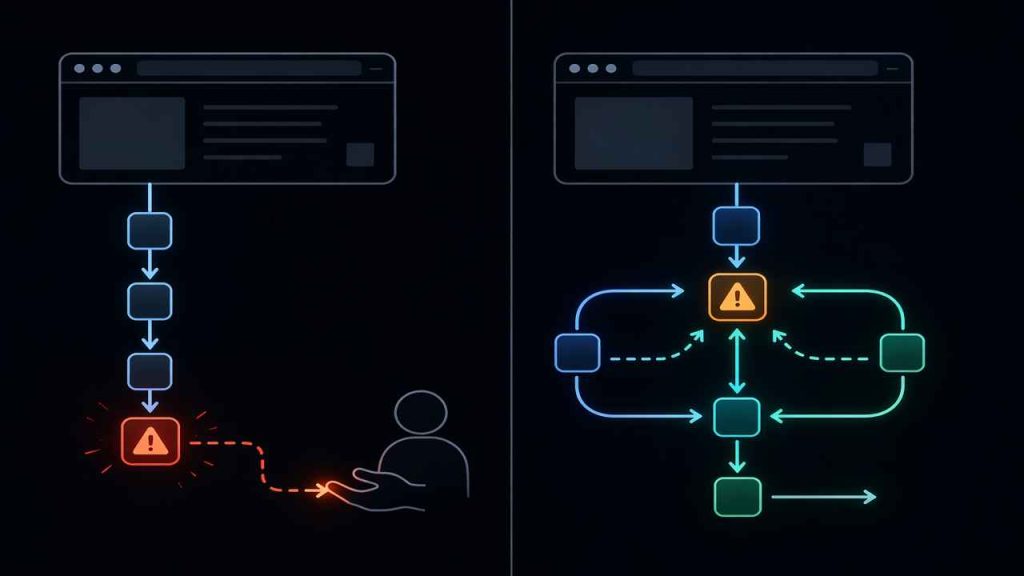
Most comparisons between agentic browsers and traditional browsers focus on automation. That misses the point. The real difference is control — specifically, who handles uncertainty when things break.