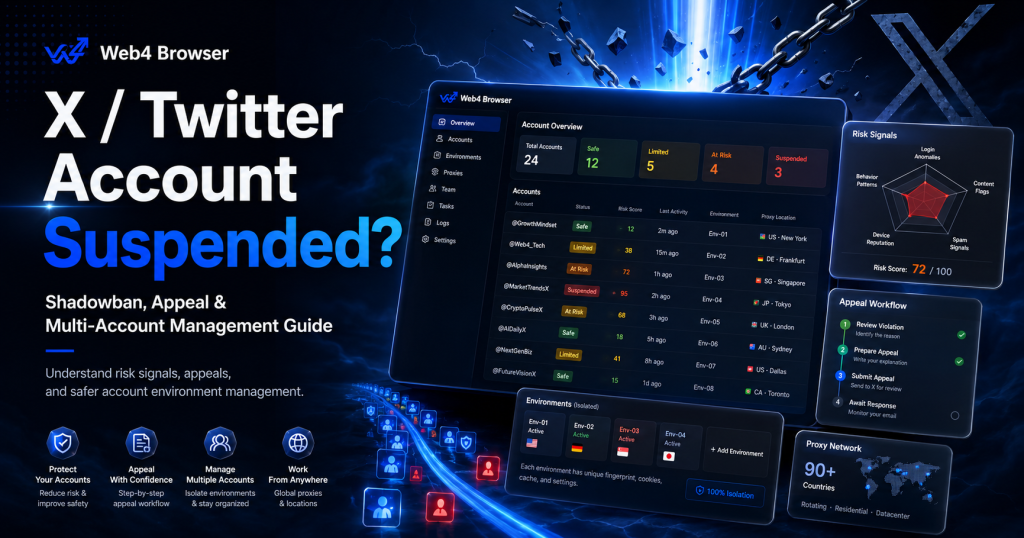
If your X account was suddenly suspended, locked, limited, or shadowbanned, it can feel like the platform made a random decision. One day your posts are getting normal engagement. The next day, your replies are hidden, your posts no longer show in search, or your account is unavailable.
In reality, X account enforcement is rarely caused by one isolated signal. It usually depends on a combination of account behavior, content patterns, security signals, account relationships, login environment, and account history.
This guide explains how to tell whether your account is suspended, locked, limited, or shadowbanned, why X accounts get flagged, how to submit an appeal, and how teams managing multiple X accounts can reduce environment-mixing and account-association risks.
The goal is not to bypass X rules. The goal is to understand account risk more clearly, avoid unnecessary operational mistakes, and build a more consistent account management workflow.
Quick Answer: Why Do X / Twitter Accounts Get Suspended?
X/Twitter accounts are usually suspended, locked, limited, or visibility-restricted when platform systems detect potential rule violations, spam-like behavior, security risks, platform manipulation, automation abuse, impersonation, or other unsafe activity.
X says users who believe their account was suspended by mistake can file an appeal through the official process described in X Help Center: Help on your suspended X account. X’s rules also prohibit platform manipulation and spam, including behavior intended to artificially amplify or suppress information or manipulate people’s experience on X, as explained in X Rules.
For teams managing multiple accounts, risk can also increase when many accounts share similar content, behavior patterns, proxies, devices, browser environments, or team access workflows.
Managing multiple accounts is not automatically the problem. The bigger risk is managing them without separate environments, clear permissions, stable proxies, and consistent operating standards.
In simple terms:
- A locked account usually means X wants to verify account ownership.
- A limited account usually means some actions are temporarily restricted.
- A suspended account means X has taken an enforcement action.
- A shadowban or visibility restriction usually means the account can still post, but visibility is reduced.
- A multi-account association issue may happen when multiple accounts look connected through shared environments, content, behavior, or team access.
Managing multiple X accounts as a team? Web4 Browser helps organize account environments, proxies, browser profiles, and team access in one workspace.
Sources Used in This Guide
This guide is based on publicly available documentation from X Help Center, X Rules, X Authenticity Policy, X account access forms, and browser privacy references such as MDN Web Docs and Web.dev.
The most important source categories are:
- X Help Center documentation on suspended accounts
- X Help Center documentation on locked and limited accounts
- X’s official locked or suspended account appeal form
- X Rules on platform manipulation and spam
- X Authenticity Policy on inauthentic accounts, behaviors, and account relationships
- X account security guidance on suspicious logins and account protection
- X cookie documentation related to device and account association
- MDN and Web.dev documentation on browser fingerprinting
This article does not claim that proxies or fingerprint browsers can bypass X enforcement. The goal is to explain account risk signals, appeal options, and team account environment management from a compliance-aware perspective.
Suspended vs Locked vs Limited vs Shadowbanned: What Is the Difference?
Not every account issue is a suspension. Before submitting an appeal, first identify what kind of restriction you are dealing with.
According to X Help Center: Help with locked or limited account, if an account is locked or limited, the first step is often to verify that you are the rightful account owner. This may involve phone, email, or reCAPTCHA verification.
| Status | What It Usually Looks Like | Can You Log In? | Typical Next Step |
|---|---|---|---|
| Locked account | X asks for phone, email, or reCAPTCHA verification | Usually yes | Verify ownership |
| Limited account | You can browse but cannot fully post, like, follow, or repost | Usually yes | Wait, verify, or reduce risky activity |
| Suspended account | Account is removed or unavailable due to enforcement | Sometimes | Submit an appeal |
| Permanent suspension | Account is removed from view and may not be allowed to create new accounts | Usually restricted | Appeal only if you believe it was a mistake |
| Shadowban / visibility restriction | Posts or replies get little reach, do not show in search, or replies are hidden | Yes | Diagnose visibility and reduce risky patterns |
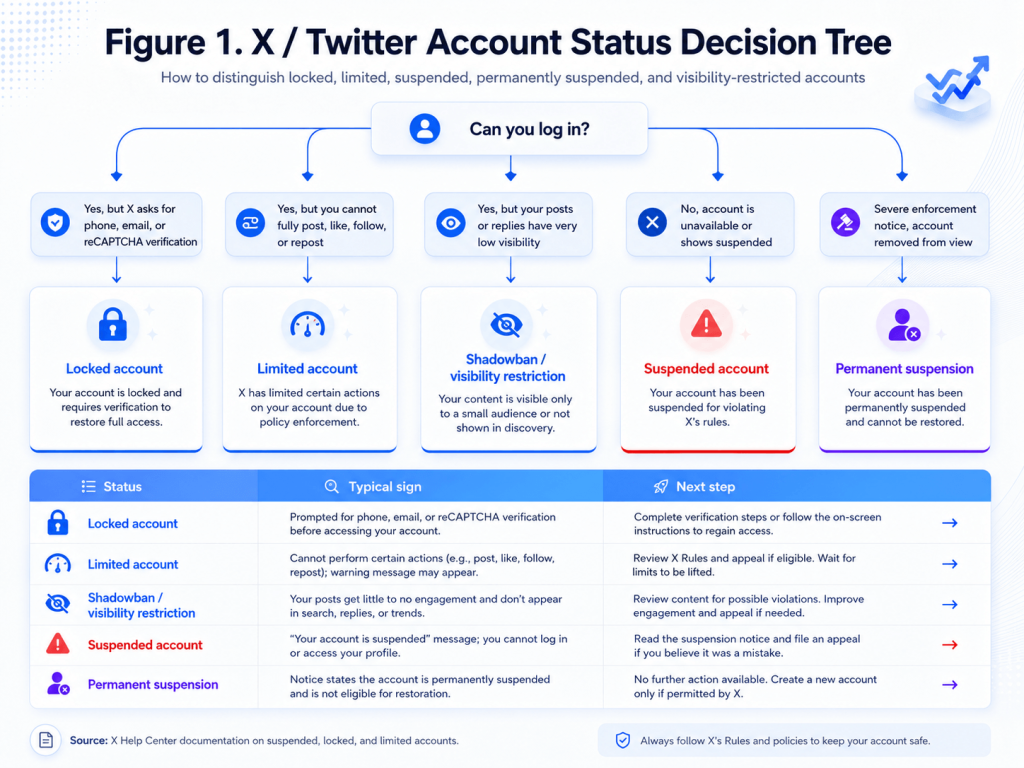
Figure 1. X / Twitter account status decision tree: locked, limited, suspended, permanently suspended, or visibility-restricted. Source: X Help Center documentation on suspended, locked, and limited accounts.
Locked Account
A locked account usually means X wants to confirm that you are the valid account owner. You may be asked to verify your phone number, email address, or complete a reCAPTCHA challenge.
This is not always the same as a suspension. In many cases, a locked account can be restored by completing the required verification steps.
Limited Account
A limited account can usually still log in and browse, but some actions may be restricted. For example, the account may not be able to post, reply, like, follow, or repost normally.
This may happen after aggressive following, unusual engagement behavior, suspicious account activity, or other signals that X wants to slow down.
Suspended Account
A suspended account is more serious. It means X has taken an enforcement action against the account. The account may become unavailable, removed from public view, or restricted from normal use.
If you believe the suspension was a mistake, you may need to submit an appeal through the official appeal process.
Permanent Suspension
Permanent suspension is the most severe account-level enforcement action. Recovery is possible only if X accepts an appeal or determines that the enforcement action was incorrect.
You should not assume permanent suspension can always be reversed.
Shadowban or Visibility Restriction
A shadowban is not always an official X term shown in your account dashboard. Users usually use the word to describe reduced visibility: posts not appearing in search, replies being hidden, or impressions suddenly dropping.
Your account may still be able to post, but other users may not see your posts or replies normally.
Why Does X / Twitter Suspend Accounts?
X account enforcement is usually not caused by a single signal. It often comes from a combination of spam-like behavior, platform manipulation, account security risk, policy violations, and automation patterns.
Spam-Like Behavior
Spam-like behavior is one of the most common reasons accounts get limited, locked, or suspended. This does not always mean the user intended to spam. Sometimes a real user or team simply operates in a way that looks automated or low-quality.
Common spam-like patterns include:
- Bulk following
- Bulk unfollowing
- Repetitive posting
- Duplicate replies
- Auto-DMs
- High-frequency likes, reposts, and replies
- Posting the same link repeatedly
- Replying to many unrelated posts with similar text
- Using irrelevant hashtags for reach
- Posting promotional content before the account has normal history
X publishes technical usage limits in X Help Center: X limits, but technical limits are not the same as a safe operating strategy. Staying under a technical limit does not automatically mean an account’s behavior looks natural, useful, or compliant.
The important point is that X does not only evaluate what you post. It also evaluates how you behave.
A new account that follows hundreds of users, replies with similar messages, and posts external links too early can look very different from a normal human account.
Platform Manipulation
Platform manipulation means using accounts, content, or behavior to artificially amplify or suppress information.
Common examples include:
- Using multiple accounts to amplify the same post
- Reposting the same message across many accounts
- Coordinating likes, replies, reposts, or quote posts
- Participating in engagement exchange groups
- Artificially boosting trends or hashtags
- Using accounts mainly to promote the same link or campaign
- Using multiple accounts to make one account look more popular
This is especially relevant for agencies, crypto teams, AI product marketers, and growth teams that manage account clusters.
The issue is not always the number of accounts. The issue is whether the accounts appear independent, authentic, and useful, or whether they appear coordinated, repetitive, and artificial.
X’s rules describe platform manipulation and spam as using X services to artificially amplify or suppress information or manipulate people’s experience on X. See X Rules: platform manipulation and spam.
Security Risk
Sometimes an account is locked or restricted because X detects a potential security risk.
Security-related signals may include:
- New device login
- Suspicious location change
- Frequent VPN location changes
- Login from risky IP ranges
- Possible password leak
- Weak account verification
- Missing two-factor authentication
- Suspicious third-party app access
- Compromised account behavior
For example, if an account normally logs in from one region and suddenly logs in from several distant countries in a short period of time, it may trigger security checks.
X’s account security tips explain that login alerts can be based on approximate location derived from the IP address used to access X, and users should secure the account if they do not recognize the login. See X Help Center: Account security tips.
A VPN or proxy does not automatically mean an account will be suspended. But unstable network locations, risky IP history, and inconsistent login patterns can increase account security risk.
Abuse and Policy Violations
Accounts may also be suspended for direct policy violations.
Examples include:
- Impersonation
- Harassment
- Hateful conduct
- Private information leaks
- Malicious links
- Scams
- Phishing
- Adult spam
- Illegal or unsafe promotions
- Repeated policy violations
These categories are more serious than ordinary visibility restrictions. If the account violated serious safety policies, recovery can be much harder.
X’s rules cover safety, privacy, and authenticity policies, including hateful conduct, privacy violations, and platform manipulation. See X Rules.
Automation Abuse
Automation is a major risk area.
High-risk automation patterns include:
- Auto-reply bots
- Auto-DM workflows
- AI-generated repetitive replies
- Aggressive engagement tools
- Follow/unfollow automation
- Scripts that mass-like or mass-repost
- Tools that interact too quickly
- Multiple accounts controlled by the same automation pattern
Automation is not only risky because it is automated. It is risky because it often creates behavior that looks repetitive, unnatural, and coordinated.
A tool that posts one useful scheduled update may be different from a bot that replies to hundreds of users with similar messages. The pattern matters.
The Five Risk Signals: Behavior, Content, Relationships, Environment, and History
A useful way to understand X account risk is to look at five signal groups: behavior, content, relationships, environment, and history.
| Risk Signal | Examples | Why It Matters |
|---|---|---|
| Behavior | High-frequency likes, follows, reposts, replies, DMs | Looks automated or spam-like |
| Content | Duplicate posts, repeated links, low-quality promotional copy | Looks like spam or platform manipulation |
| Relationships | Multiple accounts boosting the same content | Looks coordinated |
| Environment | VPN switching, shared proxies, shared browser profiles, device changes | Looks like abnormal access or account association |
| History | Previous locks, reports, linked risky accounts, third-party app abuse | Lowers account trust |
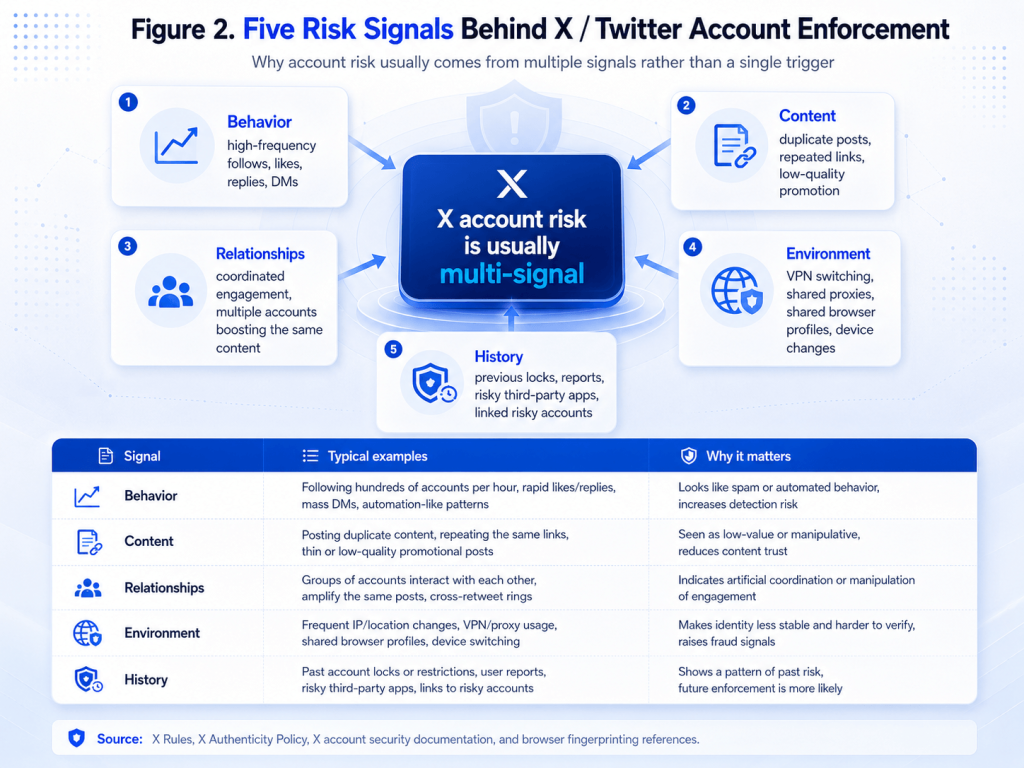
Figure 2. X account risk is better understood as a combination of behavior, content, relationships, environment, and history, rather than a single trigger. Source: X Rules, X Authenticity Policy, X account security documentation, and browser fingerprinting references.
Behavior Signals
Behavior signals include how often you follow, like, repost, reply, mention, send messages, and publish posts.
A healthy account usually has a balanced usage pattern. A risky account may have sudden bursts of high-frequency actions, repetitive engagement, or aggressive outreach.
Content Signals
Content signals include what you publish and how similar your content is across posts or accounts.
Repeated links, AI-generated promotional text, copied posts, low-context replies, and irrelevant hashtags can all reduce account quality signals.
Relationship Signals
Relationship signals include how accounts interact with each other.
If multiple accounts repeatedly boost the same posts, promote the same links, reply to the same targets, and follow the same timing pattern, they may look like a coordinated cluster.
X Authenticity Policy specifically addresses inauthentic accounts, behaviors, and content that undermine platform integrity. It also describes enforcement actions that may apply to multiple accounts in certain violation contexts.
Environment Signals
Environment signals include IP address, browser profile, device signals, timezone, language, session history, and login pattern.
Clearing cookies or using incognito mode does not create a full account environment separation. Browser and device-level signals can still remain similar.
X Cookies documentation explains that devices may be associated with an account after login, and that IP addresses and timestamps are commonly used to link a specific device with a user.
History Signals
History signals include previous locks, reports, third-party app abuse, suspicious login history, and associations with risky accounts.
A mature account with a long record of normal behavior usually has more trust than a new account with no history.
Why New X Accounts Are More Likely to Be Flagged
A new X account does not have a trust history. Actions that may look normal on a mature account can look suspicious on a newly created account.
New accounts are more likely to be flagged when they have:
- Incomplete profiles
- Weak ownership signals
- No verified email
- No phone verification when required
- No two-factor authentication
- Sudden high-frequency activity
- Early link promotion
- Aggressive following
- Repetitive replies
- Unstable VPN or proxy environments
- Multiple device logins too early
The first days and weeks of a new account should focus on building a normal usage pattern, not aggressive growth.
A safer early pattern usually looks like this:
- Complete the profile before heavy activity
- Use a consistent login environment
- Browse normally before posting heavily
- Follow gradually
- Avoid mass replies
- Avoid external links too early
- Avoid automation tools
- Build real interactions with relevant accounts
New accounts fail not only because they are new. They fail because they behave too aggressively before they have any trust history.
Why Automation, Repetitive Promotion, and Coordinated Engagement Increase Risk
The issue is not always the industry itself. Crypto, Web3, AI tool, affiliate, and marketing accounts often get flagged because their operating patterns overlap with spam: repeated links, similar messages, coordinated engagement, automated replies, and aggressive outreach.
Common risk patterns include:
- AI-generated repetitive posts
- Auto-reply bots
- Auto-DM flows
- Airdrop task bots
- Crypto promotion spam
- Affiliate link blasts
- Multiple accounts reposting the same message
- Coordinated replies from account clusters
- Posting the same promotional text across many accounts
- Using the same landing page link repeatedly
A crypto project account is not automatically risky because it is crypto. An AI tool account is not automatically risky because it talks about AI. The risk comes from the operating pattern.
If the account behaves like a broadcast machine, posts repeated links, replies to unrelated conversations, or relies on account clusters for artificial engagement, the risk increases.
For teams, the practical lesson is simple: do not confuse content distribution with platform manipulation. Each account should have a clear purpose, distinct content, and a natural engagement pattern.
How to Check If Your X / Twitter Account Is Shadowbanned
A shadowban usually refers to reduced visibility. Your account may still be able to post, but your posts or replies may not appear normally in search, replies, or recommendations.
Because shadowban is often a user-facing description rather than a clear dashboard label, you should treat it as a diagnosis process, not a confirmed internal status.
Search Visibility Check
Search for your handle or use a query like:
from:username
You can also search for exact text from a recent post.
Run the check from:
- A logged-out browser
- A browser profile that is not connected to your account
- Another account that does not follow you
If your posts do not appear in search at all, visibility may be restricted.
Reply Visibility Check
Check whether your replies appear to logged-out users or accounts that do not follow you.
Sometimes an account can still reply, but those replies may be hidden, collapsed, or placed behind “show more replies.”
This is especially important for accounts that depend on replying under popular posts.
Engagement Baseline Check
Compare recent impressions against your normal 7–30 day baseline.
A single low-performing post does not prove a shadowban. But if many recent posts suddenly drop far below your normal range, and the content quality has not changed, visibility restriction may be one possible explanation.
Useful signals include:
- Recent impressions
- Reply visibility
- Search visibility
- Profile visibility
- Follower growth changes
- Whether non-followers can see your posts normally
Profile Visibility Check
Search your handle from a logged-out browser or another account to see whether your profile appears normally.
Also check whether your posts appear under your profile and whether recent replies are visible from outside your own account.
Third-party shadowban tools can be useful for quick checks, but they cannot see X’s internal enforcement systems. Treat them as diagnostics, not official confirmation.
What to Do in the First 72 Hours After Visibility Drops
When visibility suddenly drops, the worst reaction is to panic and increase activity. The goal is to stop adding new risk signals.
Think of the first 72 hours as a stabilization window.
What Not to Do
- Do not immediately switch proxies repeatedly.
- Do not delete and repost the same content over and over.
- Do not ask other accounts to mass-like or mass-reply.
- Do not keep sending the same link.
- Do not continue aggressive follow/unfollow activity.
- Do not keep testing with multiple automation tools.
- Do not use multiple accounts to force engagement back up.
- Do not suddenly change profile name, bio, and handle all at once.
- Do not submit appeals if the account is not actually suspended.
These actions may add more abnormal signals instead of helping the account recover.
What to Do Instead
- Reduce posting frequency.
- Pause automation.
- Stop repetitive links.
- Keep your login environment consistent.
- Review recent posts, replies, and third-party app access.
- Remove risky app authorizations if needed.
- Return to normal browsing and light, natural engagement.
- Retest visibility after 48–72 hours.
If the account is only visibility-restricted, it may not need an appeal. It may need lower-risk behavior, more normal usage, and time.
If the account is locked or suspended, follow the official verification or appeal flow instead.
How to Appeal a Suspended X / Twitter Account
If your account is actually suspended, not just locked or limited, you may need to submit an appeal.
Before appealing, check the account notice carefully. If X asks you to verify phone, email, or reCAPTCHA, complete that process first. Do not treat every lock as a suspension.
Basic appeal steps:
- Log in to the affected X account.
- Read the suspension or lock notice carefully.
- Complete any required phone, email, or reCAPTCHA verification.
- Use the official locked or suspended account appeal form.
- Explain the account’s legitimate use.
- Avoid emotional language, threats, or repeated submissions.
- Attach useful evidence only if relevant.
- Wait for the review outcome.
X provides an official form to appeal a locked or suspended account. X’s suspended account help page also says users who cannot unsuspend their own account and believe the suspension was a mistake can submit an appeal through the official process.
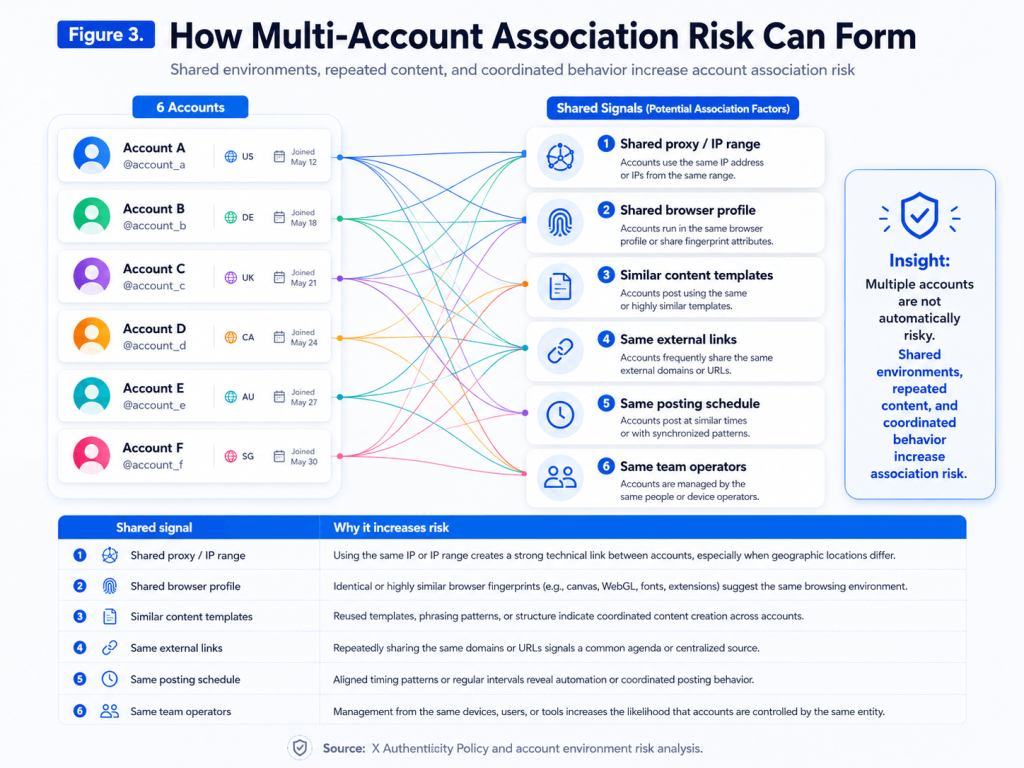
Figure 3. Recommended appeal workflow for a suspended X / Twitter account, based on X Help Center guidance and the official appeal form. Source: X Help Center and X account access appeal form.
A good appeal should be short, factual, and specific. Do not write a long emotional complaint. Do not submit the same appeal repeatedly.
What a Good Appeal Should Include
A good appeal usually includes:
- Your account handle
- The fact that you are requesting review
- The legitimate purpose of the account
- A brief explanation of what may have triggered a false positive
- A statement that you will comply with X Rules
- A request for manual review
- A willingness to complete verification if needed
What a Bad Appeal Looks Like
Avoid:
- Insults or threats
- Long emotional complaints
- “I did nothing” with no context
- Repeated copy-paste appeals
- Claims that you will create new accounts to continue the same behavior
- Mentioning tools or tactics to bypass enforcement
- Sending identity documents to unofficial third parties
Appeal writing is not about sounding desperate. It is about giving the reviewer a clear reason to review the account in context.
X / Twitter Suspension Appeal Template
Do not copy these templates without editing them. A good appeal should match your real account use, real activity, and real situation.
General False-Positive Appeal Template
Dear X Support Team,

I am writing to appeal the suspension of my account, @[username]. I believe this may have been a false positive. I am a real user and use this account for [briefly describe legitimate purpose]. I have not used bots, spam tools, coordinated manipulation, or impersonation.

If any recent activity appeared unusual, I am willing to adjust my behavior and comply with X Rules. Please manually review my account and let me know if any further verification is required.

Thank you.
Security or VPN-Related Appeal Template
Dear X Support Team,

My account @[username] was suspended unexpectedly. I suspect my recent login activity may have appeared unusual because my network environment changed while I was using a VPN for connection stability.

I am a real user and have not used bots, spam tools, or coordinated manipulation. I am willing to verify my identity or provide any additional information needed. Please manually review my case.

Thank you.
High-Activity False-Positive Appeal Template
Dear X Support Team,

I am writing to appeal the suspension of my account @[username]. Recently, I may have engaged more actively than usual by following, liking, or replying to posts in a short period of time. I understand this may have looked unusual.

I did not intend to spam or manipulate the platform. I will reduce this activity and follow X Rules going forward. Please review my account manually.

Thank you.
Account Ownership and Community Value Appeal Template
Dear X Support Team,

I am requesting a manual review of the suspension of my account, @[username]. This account is used for [briefly describe your legitimate purpose, such as industry news, community discussions, product updates, or professional networking].

I understand that some recent activity may have been interpreted as unusual, but I have not used bots, coordinated manipulation, impersonation, or spam tools. I am willing to complete any reasonable verification required to prove ownership and comply with X Rules.

Please review my account in full context.

Thank you.
Why Recovered Accounts May Get Suspended Again
Recovery does not fix the root cause. If the account returns to the same content pattern, same login environment, or same team workflow, it may be flagged again.
Common reasons recovered accounts get restricted again include:
- Same risky behavior after recovery
- Same repetitive content
- Same automation tools
- Same unstable proxy setup
- Same shared browser profile
- Same team members logging in from different devices
- Same link-promotion pattern
- Same account cluster relationship
- Same third-party app access
- Same aggressive follow/unfollow strategy
This is why appeal and recovery should not be treated as the end of the process.
After an account is restored, review:
- What content was posted before the restriction?
- Was there a sudden increase in activity?
- Did the account use unstable proxies or VPN locations?
- Did multiple team members access the account from different devices?
- Were multiple accounts posting similar content?
- Were third-party apps authorized?
- Did the account rely on automated engagement?
If the root cause remains, the account may be restricted again.
Multi-Account Management Risks: Account Association, Shared Proxies, and Browser Profiles
For teams, the biggest risk is not simply having multiple accounts. The bigger risk is that the accounts do not have separate environments, separate content patterns, separate access permissions, and separate operating workflows.
Risk increases when multiple accounts share:
- The same proxy
- The same browser profile
- The same device environment
- The same cookies or sessions
- The same content templates
- The same links
- The same posting schedule
- The same operators without clear permissions
A team may think it is managing twenty independent accounts. But from an operational perspective, those accounts may look connected if they use the same IP ranges, same browser environment, same message templates, and same engagement timing.
X’s Authenticity Policy states that if an account has been suspended for violations of X Rules, X reserves the right to also suspend other accounts it believes the same account holder or entity may be operating in violation of an earlier suspension.
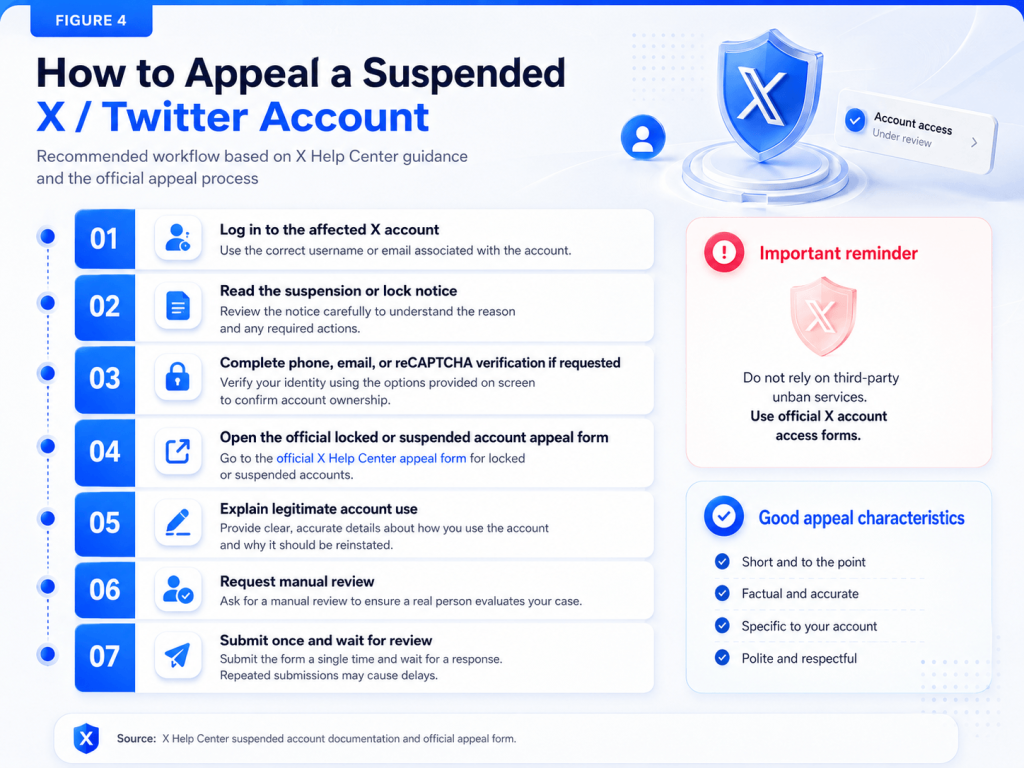
Figure 4. Multi-account association risk often comes from shared proxies, shared browser profiles, repeated content, same links, same timing, and uncontrolled team access. Source: X Authenticity Policy and account environment analysis.
Why Incognito Mode and Clearing Cookies Are Not Enough
Incognito mode mainly limits local browsing history and some session persistence. It does not create a complete independent browser environment for account operations.
Clearing cookies also does not solve everything. Browser environment signals can include timezone, language, WebRTC behavior, device characteristics, browser version, screen settings, fonts, extensions, and usage patterns.
MDN Web Docs defines browser fingerprinting as a practice where websites identify a particular browser, and by extension a user, by collecting and combining distinguishing features of the browser and operating system. Web.dev’s fingerprinting guide also explains that device type, browser, screen size, and installed fonts can differ between users and may be used as identifying characteristics.
For serious multi-account teams, the question is not only “Did we clear cookies?”
The better question is:
Does each account have a stable, separate, and documented operating environment?
If your team is still managing X accounts with spreadsheets, shared passwords, and random proxy notes, it may be time to move to a structured account environment workspace.
What Proxies and Fingerprint Browsers Can and Cannot Solve
Proxies and fingerprint browsers are useful for account environment management, but they are not magic anti-ban tools.
| Problem | Can a Proxy Help? | Can a Fingerprint Browser Help? | Still Required |
|---|---|---|---|
| Unstable IP location | Yes | No | Stable proxy strategy |
| Shared browser profile | No | Yes | One account, one environment |
| Cookie/session mixing | No | Partly | Isolated browser profiles |
| Team access chaos | No | Partly | Permissions and logs |
| Duplicate content | No | No | Content strategy |
| Spam automation | No | No | Platform-compliant behavior |
| Coordinated manipulation | No | No | Independent account purposes |
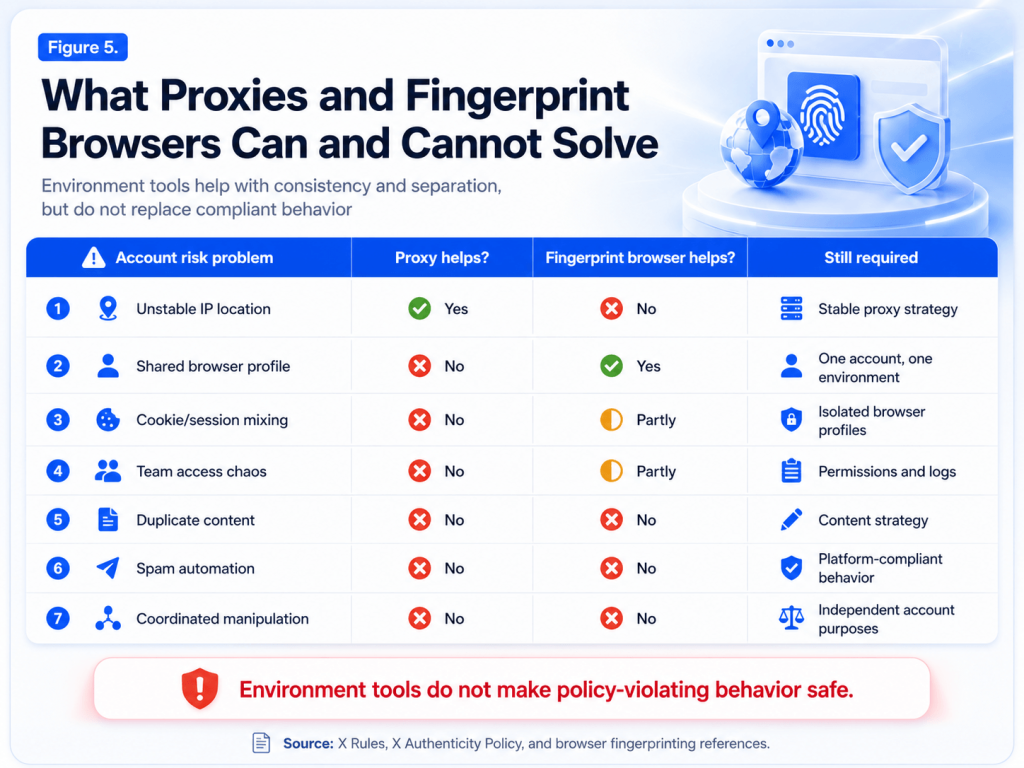
Figure 5. Proxies and fingerprint browsers help with environment consistency and separation, but they do not solve duplicate content, spam automation, or policy violations. Source: X Rules, X Authenticity Policy, MDN Web Docs, and Web.dev browser fingerprinting references.
What Proxies Can Help With
A proxy can help create a more consistent network environment if it is stable, appropriate, and not overused across too many accounts.
A proxy can help reduce sudden IP changes when compared with unstable VPN switching.
However, a proxy cannot fix spam behavior, repeated links, policy-violating content, or coordinated manipulation.
What Fingerprint Browsers Can Help With
A fingerprint browser can help separate browser environments. Instead of logging many accounts into the same browser profile, each account can use a separate environment with its own profile context.
This helps reduce environment mixing.
However, a fingerprint browser cannot make duplicate content safe. It cannot make spam automation safe. It cannot guarantee that an account will never be suspended.
What Teams Still Need
Teams still need:
- Clear account purpose
- Distinct content strategy
- Stable proxy mapping
- Separate browser environments
- Team permissions
- Operation records
- New-account SOPs
- Platform-compliant behavior
A proxy or fingerprint browser does not make policy-violating behavior safe. These tools help with environment consistency and account separation; they do not replace platform-compliant content and behavior.
How Web4 Browser Helps Teams Manage X Account Environments
Web4 Browser helps teams manage account environments more consistently by connecting each account with its browser profile, proxy, permissions, and workflow context.
It is not positioned as a guarantee against suspension. It is a workspace for organizing multi-account environments, reducing account environment chaos, and standardizing team operations.
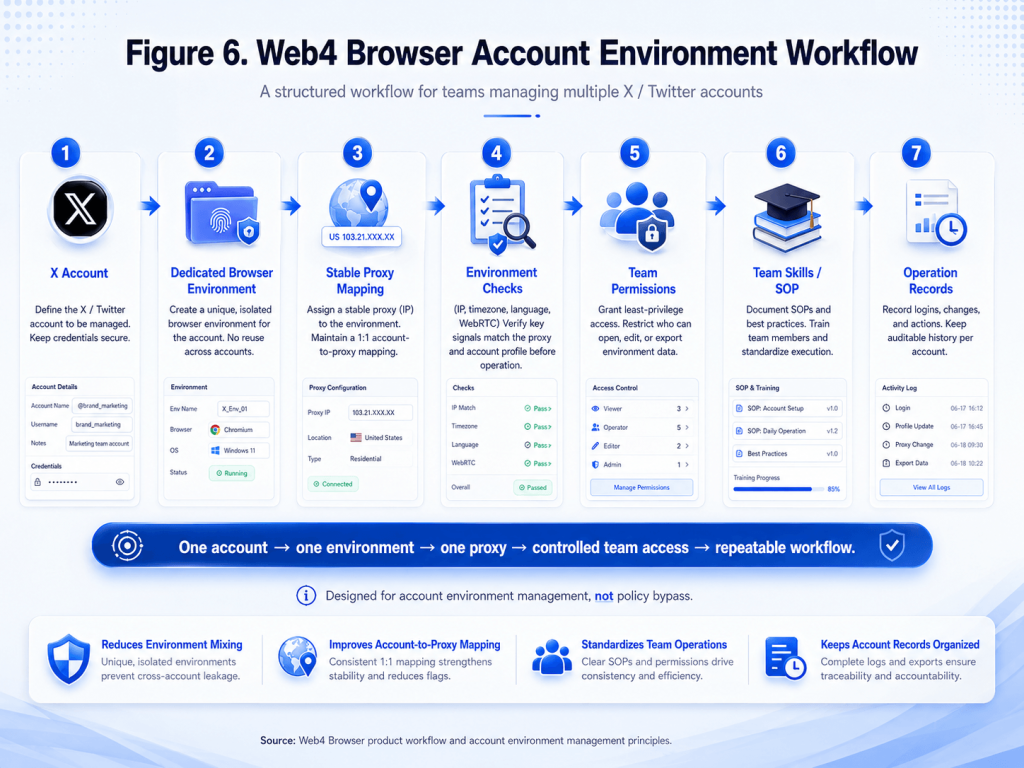
Figure 6. Web4 Browser account environment workflow for teams managing multiple X / Twitter accounts. Source: Web4 Browser product workflow and account environment management principles.
One Account, One Browser Environment
Keep each X account in its own browser environment instead of switching accounts inside the same browser.
This reduces the risk of mixing cookies, sessions, profile settings, and browser context across accounts.
One Environment, One Proxy
Map each account environment to a stable proxy setup to reduce IP-location inconsistency.
Instead of letting team members randomly choose or change proxies, each account can have a clearer environment mapping.
Environment Checks Before Login
Check proxy status, timezone, language, WebRTC, and other environment signals before team members log in.
This helps teams identify environment mismatches before they become account-level problems.
Team Permissions
Allow team members to use assigned environments without sharing raw passwords, proxy details, or browser profiles everywhere.
For teams, this is important. Many account problems are caused not by one bad tool, but by uncontrolled access: too many people logging in from too many places with too little context.
Team Skills / SOP
Turn account operation standards into repeatable team workflows, so new members do not rely on guesswork.
For example, a team can document:
- How a new X account should be warmed up
- When links can be posted
- How often the account should reply
- What actions should be avoided after a visibility drop
- How to check the environment before login
- What to do when an account is locked or limited
A repeatable SOP is more reliable than informal chat instructions.
Account Environment Records
Keep account, proxy, environment, and operator context organized instead of spreading them across spreadsheets and chat messages.
This helps teams understand:
- Which account uses which proxy
- Which browser environment belongs to which account
- Who has permission to access each environment
- What workflow should be followed
- Whether an environment has changed recently
For growing teams, this is often the difference between account management and account chaos.
X / Twitter Account Risk Checklist for Teams
Use this checklist before scaling X account operations.
Account Setup
- Complete profile
- Verified email
- Phone verification when appropriate
- Two-factor authentication enabled
- No suspicious third-party app access
- Clear account purpose
- Consistent branding and identity
Login Environment
- Stable proxy
- Consistent location
- One browser environment per account
- Avoid shared sessions
- Avoid frequent VPN location changes
- Check WebRTC, timezone, and language consistency
- Avoid public Wi-Fi for important accounts
Team Workflow
- Permission-based access
- No random password sharing
- No proxy sharing in chat
- Operation logs
- Clear SOP for new accounts
- Clear response plan for locked or limited accounts
- Separate responsibilities for content, login, and account review
Content Behavior
- No duplicate posts across accounts
- Avoid repetitive links
- Avoid auto-DM campaigns
- Avoid aggressive follow/unfollow
- Avoid coordinated engagement
- Rewrite AI-generated content manually
- Avoid irrelevant hashtags
- Avoid replying to unrelated conversations with promotional text
Recovery and Review
- Identify the account status before acting
- Do not appeal if the account is only visibility-restricted
- Do not submit repeated appeals too quickly
- Remove risky third-party app access
- Review recent posts and links
- Stabilize the login environment
- Document what changed before the restriction
FAQ
Why Was My X Account Suspended?
X accounts may be suspended for spam-like behavior, platform manipulation, security risks, impersonation, abusive content, automation abuse, or other violations of X Rules.
In many cases, the issue is not one single action. It is a combination of behavior, content, relationships, login environment, and account history.
What Is the Difference Between a Locked and Suspended X Account?
A locked account usually requires ownership verification, such as phone, email, or reCAPTCHA verification. A suspended account is an enforcement action that may require an appeal.
If X asks you to verify ownership, complete that process first before assuming the account is suspended.
What Is a Twitter Shadowban?
A Twitter or X shadowban usually refers to reduced visibility, such as posts not appearing in search, replies being hidden, or impressions dropping sharply, even though the account can still post.
It may not always appear as an official dashboard label.
How Do I Check If My X Account Is Shadowbanned?
Check search visibility, reply visibility, profile visibility, and recent impression trends from a logged-out browser or another account.
You can also search for from:username or exact text from recent posts.
Can Using a VPN Get My X Account Suspended?
VPN use alone does not necessarily mean suspension, but frequent location changes, risky IPs, and inconsistent login environments can trigger security checks.
For account teams, a stable and documented proxy strategy is usually safer than random VPN switching.
Can I Appeal a Permanently Suspended X Account?
Yes, if you believe it was a mistake. However, permanent suspension is the most serious enforcement action, and recovery is not guaranteed.
Your appeal should be factual, concise, and specific.
What Should I Write in a Twitter Suspension Appeal?
Be concise, factual, and specific. Explain the legitimate use of the account, address possible false-positive signals, and request manual review.
Avoid emotional complaints, threats, repeated submissions, or claims that you will bypass enforcement.
Should I Submit Multiple Appeals?
Do not spam the appeal form. Submit one clear appeal, then wait for the review process.
If you submit again, make sure you have new information, not just the same message repeated.
Can a Proxy Prevent X Account Suspension?
No. A proxy may help with network consistency, but it cannot protect accounts from spam, platform manipulation, automation abuse, or policy violations.
A proxy is an environment tool, not a policy shield.
Can a Fingerprint Browser Help With X Multi-Account Management?
A fingerprint browser can help separate browser environments for different accounts, but it must be combined with stable proxies, compliant behavior, and team access controls.
It helps reduce environment mixing. It does not guarantee that accounts will never be restricted.
Is Managing Multiple X Accounts Allowed?
Multiple accounts can be legitimate when they have distinct purposes and comply with X Rules. Risk increases when accounts are used for coordinated manipulation, duplicate content, or artificial amplification.
The key is whether the accounts have independent purposes, content, and behavior.
How Does Web4 Browser Help X Account Teams?
Web4 Browser helps teams organize account environments, proxies, browser profiles, permissions, and repeatable workflows in one workspace.
For X account teams, this means clearer account-to-environment mapping, less random proxy sharing, less browser profile mixing, and more standardized operating procedures.
References
This guide is based on publicly available documentation and technical references, including:
- X Help Center: Help on your suspended X account
- X Help Center: Help with locked or limited account
- X Help Center: Appeal a locked or suspended account
- X Rules
- X Authenticity Policy
- X Account Security Tips
- X Cookies Documentation
- MDN Web Docs: Fingerprinting
- Web.dev: Fingerprinting
Final Takeaway
X/Twitter account suspension, locking, limiting, and shadowbanning are not only content problems. They are often account operation problems.
For individual users, the priority is to understand the account status, reduce risky behavior, complete verification when required, and submit a clear appeal if the account is suspended.
For teams managing multiple X accounts, the priority is broader: separate account environments, stable proxy mapping, permission-based access, clear operating records, and repeatable workflows.
Build a more consistent X multi-account workflow with Web4 Browser. Create separate browser environments, bind proxies, manage team permissions, and turn your account operation standards into repeatable Team Skills.