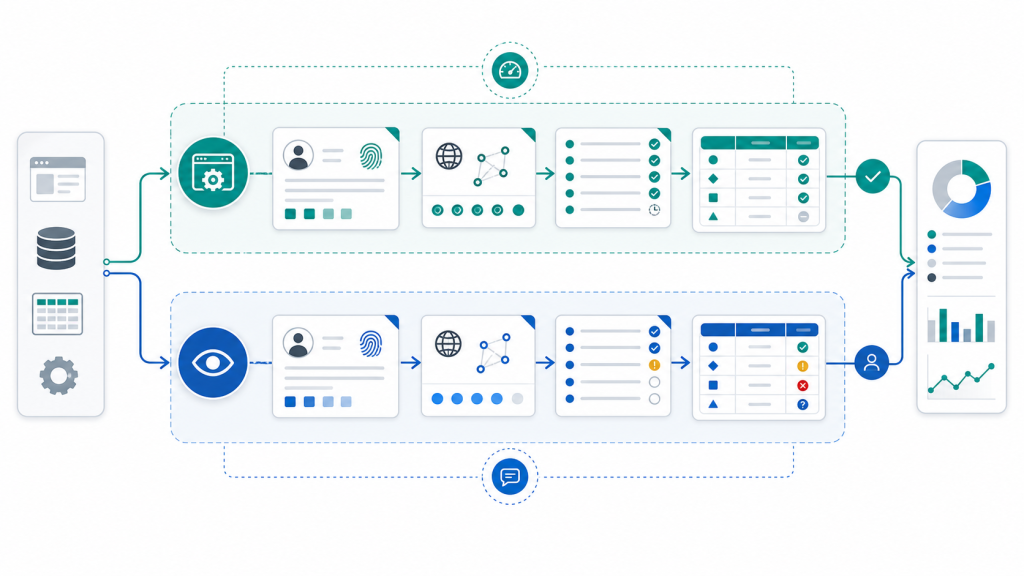
Headless browser automation is useful when a browser task is predictable, observable, and easy to verify after it runs. Visible review is better when a teammate needs to inspect page state, account context, or an unexpected branch before the workflow continues.
The hard part is not choosing one mode forever. The hard part is deciding which part of a workflow can run in the background, which part should stay visible, and where the team needs a review checkpoint. This guide gives Web4 teams a practical decision table for that boundary.
Why This Decision Matters
Many teams move too quickly from manual browser work to full background execution. A task may look repetitive, but the browser state underneath it can still depend on profile settings, proxy mapping, session status, extensions, and the current page path. If those layers are not stable, a background run can produce output that is difficult to trust.
A better workflow separates the task into stages. Routine checks can use headless automation evidence, while state-sensitive moments stay visible long enough for a human reviewer to decide what should happen next.
The Four Operating Modes
Before assigning a browser task to automation, choose one of four modes:
| Mode | Best fit | Review expectation |
|---|---|---|
| Visible manual | New workflow, uncertain account state, or unfamiliar page path | A teammate watches the page and records the decision. |
| Visible assisted | Repeatable steps with occasional judgement | The operator lets automation help, but keeps the browser visible. |
| Hybrid checkpoint | Mostly repeatable task with one or two sensitive branches | The workflow pauses at predefined review points. |
| Headless run | Stable task with clear inputs, outputs, and evidence | The team reviews logs, screenshots, and status after execution. |
This is not a maturity ladder where every task must end as headless. Some tasks should remain visible because the cost of a wrong continuation is higher than the time saved.
Workflow Decision Table
Use this table before moving a browser workflow into the background:
| Question | Use visible review when | Headless is reasonable when |
|---|---|---|
| Is the page path stable? | The page can branch, show a new prompt, or depend on recent account activity. | The same inputs reliably lead to the same page states. |
| Is profile state known? | The team is unsure about login status, extensions, storage, or profile notes. | The profile state is documented and recently checked. |
| Does proxy context matter? | Region, language, or network context can change the page result. | Proxy mapping is fixed and logged for the task. |
| Can success be verified later? | The only proof is what the operator sees during the run. | Logs, screenshots, URLs, and output records can prove what happened. |
| Does the next action need judgement? | The task may require approve, stop, repair, or escalate decisions. | The next action is a defined rule with a safe stop condition. |
If the left column is true for two or more rows, keep a visible checkpoint. If the right column is true across the workflow, a background run may be appropriate.
Start With Visible Assisted Runs
A visible assisted run is often the best first step. The team keeps the browser open, records page states, and lets automation handle repetitive steps while a reviewer watches the branch points. This creates evidence for later automation without hiding the workflow too early.
Use this mode when building a new account-context browser workflow. The goal is to learn which states are stable enough to automate and which states still need human judgement.
Move Only Stable Segments to Headless
Headless browser automation works best as a segment-level decision. A full workflow may contain stable and unstable parts. For example, opening a known page, checking a visible status, and saving a screenshot may be stable. Deciding what to do after an unexpected message appears may not be stable.
Split the workflow into these units:
- Input setup: profile, proxy, account context, and target URL.
- Routine browser steps: navigation, page checks, form-independent actions, or data capture.
- Evidence capture: screenshot, final URL, visible status, and task log.
- Decision point: continue, pause, repair, or stop.
Only the middle two units should move to background execution when the inputs are reliable and the decision point is already defined.
Add Proxy and Profile Checks Before Background Runs
A headless run should not inherit an unknown environment. Before a recurring background task starts, verify that the profile, proxy assignment, timezone, and language still match the task’s expected operating context.
This is why proxy review belongs inside the workflow rather than as a separate technical step. A proxy assignment workflow should connect the profile to the account context, not just prove that a connection exists.
Use Evidence Logs as the Review Surface
Once a task runs without a visible browser, the review surface moves to evidence. The team needs enough information to know what the browser saw and why the task stopped or continued.
At minimum, capture:
- Profile name or ID.
- Proxy region or assignment label.
- Start URL and final URL.
- Screenshot at the final state.
- Task step, result status, and stop reason.
- Reviewer decision for the next run.
This connects directly to browser automation evidence logs. Logs are not only for debugging. They are the interface that makes background execution reviewable by a team.
When to Keep the Browser Visible
Keep the browser visible when the task is still teaching the team something about the workflow. That includes first-time tasks, newly changed pages, unclear account state, or any step where the correct next action is not written down yet.
Visible review is also the right choice when the team is validating a new profile setup. The profile may open correctly while still carrying a mismatch in proxy, timezone, language, or session context. For that class of problem, use a profile consistency checklist before allowing the task to run in the background.
When Headless Automation Is a Good Fit
Headless automation is a good fit when the workflow has already passed visible review and the team can describe the expected states. It should have stable inputs, clear output evidence, and a stop condition that does not require guessing.
Good candidates include page availability checks, known-status screenshots, routine public-page monitoring, internal QA checks, and repeatable data capture where account context is already verified. The common pattern is simple: the task can run without watching the page because the evidence after the run is enough for review.
Where Web4 Browser Fits
Web4 Browser helps teams treat browser automation as an operating workflow rather than a loose script. Profiles, proxy mapping, visible review, headless execution, and evidence logs can be planned as one system inside a browser automation workspace.
That is the practical handoff point. Start visible, capture the real states, move stable segments to headless, and keep human review at the moments where judgement still matters. The result is not maximum automation. The result is automation that a team can inspect, repeat, and improve.
Final Takeaway
Headless browser automation should be assigned to stable workflow segments, not to every task that looks repetitive. If the page path, profile state, proxy context, and evidence trail are clear, background execution can save time. If any of those pieces are uncertain, visible review is still part of the workflow.