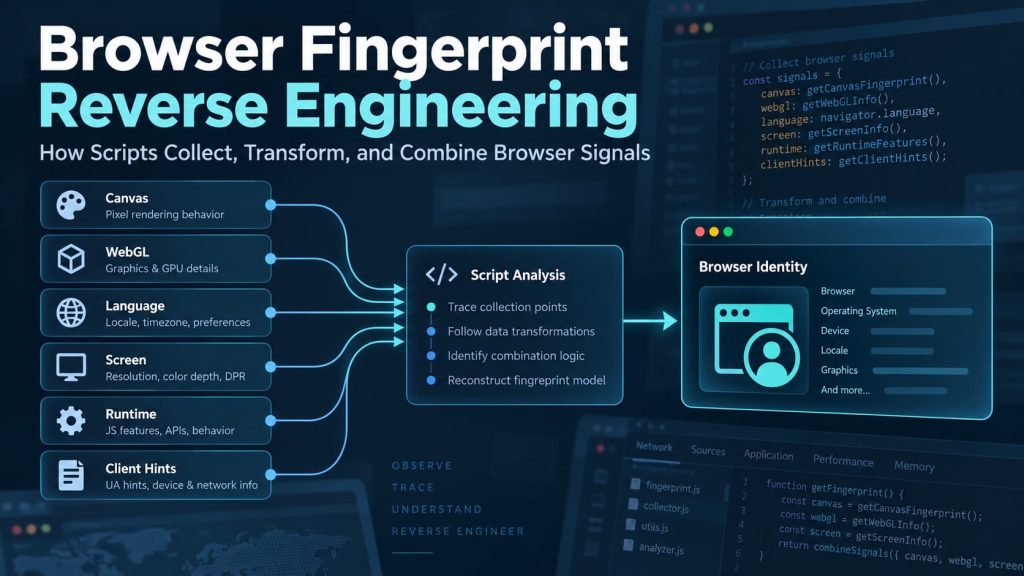
A website shows you a browser fingerprint result.
You may also see values such as browser version, operating system, language, timezone, screen size, Canvas output, or WebGL information.
The natural question is: where did that result actually come from?
There is usually no single field inside the browser called fingerprint that a website simply reads. A fingerprinting script collects smaller pieces of information, runs tests, processes some results, and may combine part of that data into fingerprint components, an identifier, a classification, or another risk-related result.
If you only want to know what your browser exposes, a browser fingerprint checker may already be enough.
But if you want to know how a particular fingerprinting implementation produced or used those signals, the task changes. You need to work backward from the observable output and trace which browser APIs were called, what values they returned, how those values were processed, and whether later decisions happened inside the browser or somewhere else.
That process is Browser Fingerprint Reverse Engineering.
It can reveal a great deal about browser-side collection and processing. It cannot automatically reveal private server-side logic, and knowing where observation stops is part of doing the analysis correctly.
What Browser Fingerprint Reverse Engineering Actually Means
The first distinction is important:
You are not reverse engineering the browser fingerprint itself. You are reverse engineering the implementation that collects, transforms, combines, or uses fingerprint signals.
MDN describes browser fingerprinting as identifying a browser by collecting and combining characteristics of the browser and underlying operating system, including information such as browser version, timezone, language, fonts, and display characteristics.
Reverse engineering takes a particular implementation and asks how that collection-and-combination process works.
Suppose a script reads navigator.language.
Finding that API call proves that language information was collected. It does not yet explain what role the value played.
You still need to determine whether the value was stored directly, compared with another locale-related value, transformed into another format, included in a fingerprint component, or used only as a validation signal.
The same logic applies to User-Agent, Canvas, WebGL, fonts, timezone, screen information, browser capabilities, and other signals.
The useful question is not simply:
What values exist?
It is:
What happens to each value after the script obtains it?
A Fingerprinting Script Is Easier to Understand as a Data Flow
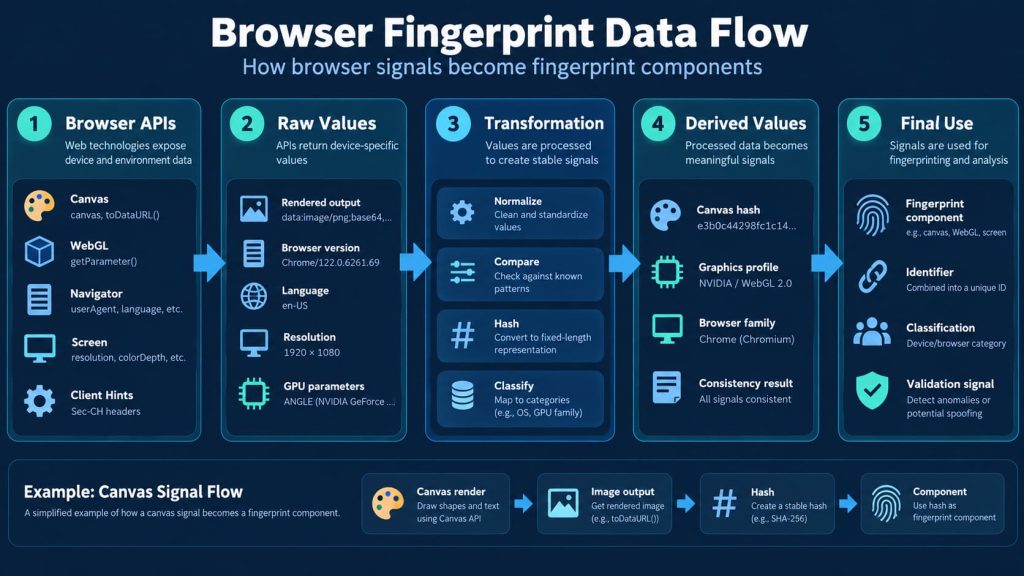
A simple Canvas example makes the process easier to see.
A script may:
- ask Canvas to render some content;
- read the rendered output;
- transform that output into another value;
- store or transmit the result as one fingerprint component.
That gives you a basic flow:
Browser API
→ observed result
→ processing
→ derived value
→ fingerprint component
A more complex system may then combine several components or send them elsewhere for additional processing.
This makes it useful to separate five layers:
| Layer | What you are trying to understand |
|---|---|
| Collection | Which browser APIs or behaviors are queried |
| Raw values | What the browser actually returns |
| Transformation | Whether values are normalized, grouped, encoded, or hashed |
| Combination | Which values appear to be used together |
| Final use | Whether the result becomes an identifier, classification, validation signal, or another decision input |
Not every implementation uses all five layers.
For example, the open-source FingerprintJS library describes itself as a client-side browser fingerprinting library that queries browser attributes and computes a hashed visitor identifier from them.
Other implementations may collect signals in the browser but perform later processing elsewhere.
That is why a useful Browser Fingerprint Reverse Engineering analysis follows the data flow rather than starting and ending with a final fingerprint value.
Start With the Collection Path, Not the Final Result
A fingerprint value such as:
7f9a2...
may look important, but by itself it tells you very little.
The useful information usually appears earlier.
Before that value existed, the script had to collect something.
That may include direct property reads such as:
navigator.userAgentnavigator.languagenavigator.languages- screen dimensions
- hardware concurrency
- supported browser features
It may also perform active tests.
Instead of simply reading a property, the script may ask the browser to render something, measure something, or report which capabilities it supports.
Canvas is a good example.
A script may create a Canvas element, draw content, and then read a representation of the rendered image. The standard toDataURL() method, for example, returns a data URL containing a representation of the image currently stored in the Canvas.
For reverse engineering, the useful questions are not simply:
Is Canvas used?
They are:
What is drawn?
How is the output read?
What function receives that output next?
The API call tells you where collection begins.
Following the value afterward tells you how it becomes part of a fingerprinting process.
Raw Values and Derived Values Are Different Things
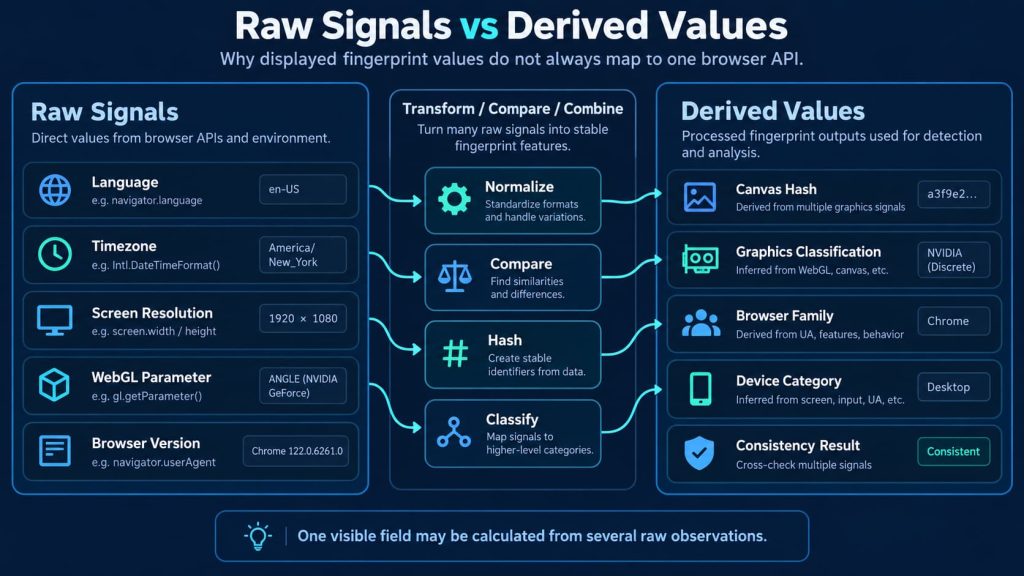
Some fingerprint values come directly from the browser.
Others are calculated from those values.
The first group can be called raw signals.
The second group can be called derived values.
A raw signal might be:
- a timezone
- a preferred language
- a screen resolution
- a supported API
- a WebGL parameter
- a browser version
A derived value might be:
- a Canvas hash
- a graphics classification
- a normalized browser family
- a device category
- a consistency result
- a combined fingerprint component
This distinction matters because a field shown by a fingerprinting tool does not necessarily correspond to one JavaScript property.
A value labeled “graphics fingerprint,” for example, could be calculated from several graphics-related observations.
A browser classification could depend on both reported browser information and actual browser behavior.
So one of the most useful reverse-engineering questions is:
Which raw observations were required to produce this value?
That is usually more informative than simply listing every field a script collects.
Browser and Platform Information May Come From Several Sources
The User-Agent string is one obvious source of browser information, but it is not the only one.
Supporting browsers can expose overlapping browser and platform information through several paths, including HTTP request headers, JavaScript properties, Client Hints, feature detection, and observable browser behavior.
MDN documents Client Hints as request headers through which servers can obtain selected information about the device, network, user agent, and user preferences. In supporting browsers, User-Agent Client Hints can also expose browser and platform information through a JavaScript API.
For someone new to reverse engineering, the important idea is simpler:
Two technical sources can describe the same browser from different angles.
A fingerprinting implementation may therefore compare them.
For example, it may effectively ask:
Does the browser claim to belong to one browser family while its supported features behave like another?
This is why inspecting one visible value does not necessarily explain the final result.
Reverse engineering tries to determine whether an implementation trusts one source or compares several related sources together.
Canvas Reverse Engineering Means Following the Rendered Result
Canvas fingerprinting is often explained as:
A website reads your Canvas.
That description is too broad for reverse engineering.
The useful path is:
drawing instructions
→ rendered output
→ transformation
→ component
A script may:
- create a Canvas element;
- draw text, shapes, colors, or other content;
- read a representation of the rendered result;
- transform or hash that result;
- store or transmit the new value.
When reading the code, look for both ends of the operation.
First:
What is being rendered?
Then:
What value is extracted from the result?
Finally:
Where does that value go next?
Two fingerprinting libraries can both use Canvas and still generate different components because they draw different content or process the output differently.
The browser provides the rendering surface.
The fingerprinting implementation decides how to turn its observations into a usable signal.
WebGL Reverse Engineering Is About Following Many Values Into One Result
WebGL often gives an implementation many possible collection points.
For example, WebGLRenderingContext.getParameter() returns values for a wide range of WebGL parameters, including implementation limits and rendering-related state.
But during reverse engineering, the important question is not how many WebGL values exist.
It is what happens after they are read.
Suppose a script calls getParameter() repeatedly.
You then need to trace whether those results are:
- stored separately;
- placed into one object;
- normalized;
- combined into a string;
- reduced into a classification;
- hashed;
- sent elsewhere for further processing.
A long list of WebGL calls does not automatically mean every returned value becomes an independent fingerprint component.
Some values may contribute to a broader graphics description.
Others may be collected for validation.
So the reverse-engineering task is narrower than:
What could WebGL expose?
It is:
Which WebGL observations does this implementation actually use, and how do they move through the processing chain?
Related Signals Can Reveal More Than Individual Values
Some values are easy to understand on their own.
Language is one example.
Timezone is another.
But a fingerprinting implementation may care more about whether several related values make sense together.
JavaScript can expose browser language, preferred languages, locale information, timezone information, and date-formatting behavior through different interfaces.
If a script collects several of them, it does not necessarily treat them as several independent identity fields.
It may instead examine whether they describe a coherent regional environment.
The same logic can apply elsewhere.
A claimed browser family can be compared with supported APIs.
A graphics description can be compared with rendering behavior.
A platform value can be compared with browser-core characteristics.
This does not mean every unusual combination proves manipulation. People travel, change language settings, use remote machines, or run uncommon hardware.
The narrower technical conclusion is:
Fingerprinting implementations may use relationships between signals, not just individual values.
That becomes especially important when analyzing modified or isolated browser environments.
Fonts, Audio, Screen Data, and Runtime Tests Follow the Same Method
Other fingerprint families use different browser features, but the reverse-engineering method remains similar.
Fonts
A fingerprinting script may test font availability through rendering or measurement behavior rather than receiving one convenient browser property containing every installed font.
The useful reverse-engineering question is:
How is font availability being tested, and where does the result go afterward?
Audio
A script may create an audio-processing environment, perform repeatable operations, and inspect resulting values.
Again, follow:
operation → result → transformation
rather than stopping when AudioContext appears somewhere in the source.
Screen information
Screen width and height may be read directly, but screen-related information can also appear alongside other device characteristics.
The useful question is whether those values remain separate or contribute to a broader description.
Runtime behavior
Some implementations inspect what the browser can actually do.
That may include supported APIs, JavaScript behavior, browser-specific objects, or feature availability.
These observations can help an implementation compare reported browser information with actual browser behavior.
Minified or Obfuscated Code Still Has to Interact With the Browser
Real fingerprinting scripts are not always easy to read.
They may be minified, with whitespace and readable formatting removed.
They may also be obfuscated, with shortened variable names or deliberately difficult code structures.
Instead of a readable name such as:
canvasFingerprint
you may see:
a
or:
x1
That makes the source harder to follow, but it does not remove the underlying behavior.
The script still has to:
- call browser APIs;
- receive values;
- perform tests;
- transform results;
- store or transmit data.
So the practical goal is not necessarily to reconstruct the original source exactly.
It is to reconstruct the data flow.
For example:
browser property
→ collection function
→ intermediate object
→ network request
or:
Canvas rendering
→ image output
→ transformation
→ fingerprint component
Once you can follow that path, the original variable names matter much less.
Not Every Collected Value Changes an Identity Result
Finding an API call proves that the script queried that API.
It does not prove that the returned value changes a visitor identifier or other identity result.
A fingerprinting, bot-detection, or anti-fraud implementation may collect information for different reasons:
- identification
- automation detection
- compatibility checks
- tamper detection
- analytics
- consistency checks
- risk analysis
Some values may be too unstable to use as persistent identity components.
Others may be useful specifically because they change when the environment changes.
A useful reverse-engineering result should therefore distinguish between:
Collected
The script reads the value.
Transformed
The script processes the value.
Used in identity
The value appears to contribute to an identifier or identity component.
Used for validation or another decision
The value appears to support a different purpose.
These are different conclusions.
Without that distinction, a long list of detected APIs can look far more meaningful than it really is.
Controlled Changes Can Reveal Dependencies
Once you understand the collection path, controlled comparison can help show which outputs depend on the same source.
The method is simple:
Change one legitimate test condition at a time and observe what changes with it.
Suppose you change only the browser language in an environment you control.
Three output fields change.
Those fields may depend directly or indirectly on the same locale-related source.
Now change only the browser version.
If several apparently unrelated values move together, they may all depend on browser-core behavior rather than independent settings.
The goal is not to collect many different fingerprint IDs.
The goal is to answer:
When this input changes, which outputs change with it?
That creates a dependency map.
It also helps reveal why fingerprint values cannot always be treated as independent switches.
Browser-Side Reverse Engineering Has a Clear Limit
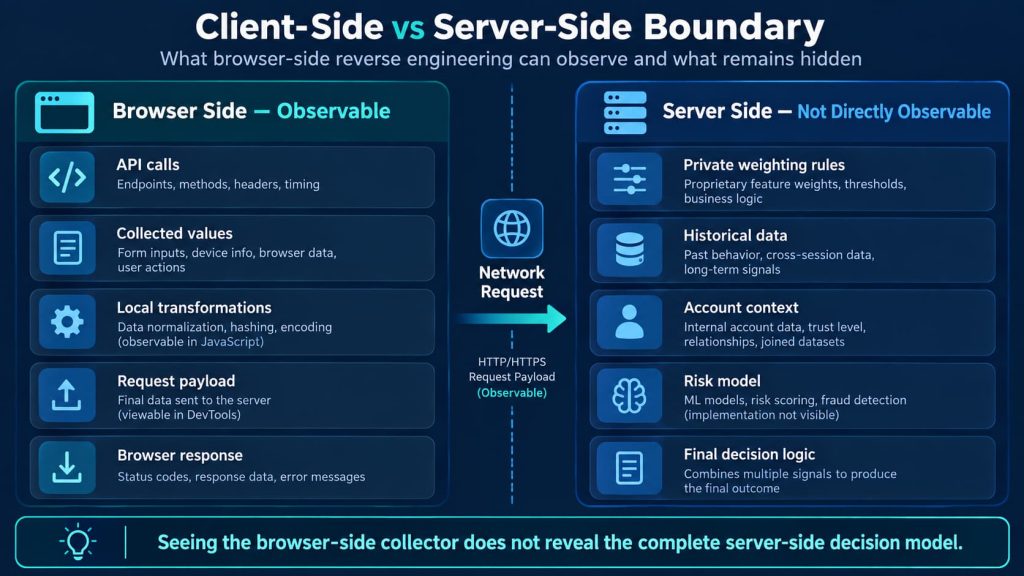
Anything that happens inside the browser can potentially leave observable evidence.
Anything that happens only on a remote server may not.
Suppose a browser-side script collects ten values and sends them in a request.
You may be able to reconstruct:
- where those values came from;
- how some were transformed;
- how the request payload was built;
- when it was sent;
- what response came back.
If additional processing happens only after the data reaches a remote service, browser-side inspection cannot by itself reveal the complete server-side logic.
That may include private weighting rules, historical data, account context, server-only signals, or other information that never appears in the client.
This changes how strong your conclusion can be.
A weak statement would be:
We reverse engineered the fingerprinting system.
A more accurate statement might be:
We reconstructed the browser-side collection and transformation process, but the server-side decision model remains unknown.
That is not an incomplete result.
It is the correct technical boundary.
Reverse Engineering Also Exposes Signal Provenance
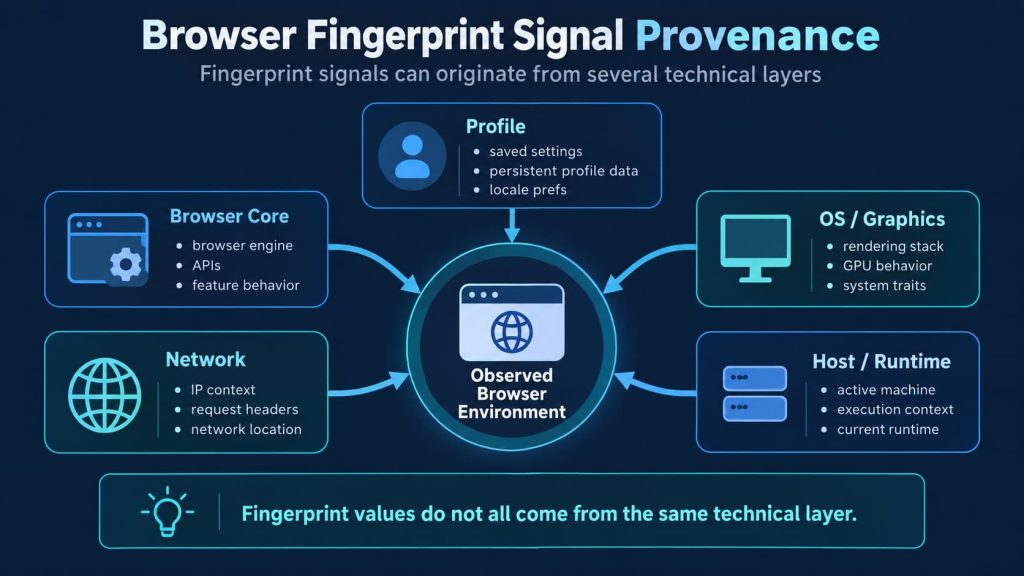
Once values are traced backward, another useful pattern appears.
Different fingerprint signals can originate from different technical layers.
Some follow the browser engine.
Some depend on the operating system or graphics stack.
Some belong to saved browser configuration.
Some come from the network.
Others still depend on the active host or runtime.
This means fingerprint values do not always behave like independent settings.
Changing a reported browser identity does not automatically change supported APIs or rendering behavior.
Changing an IP location does not automatically change browser language, timezone, graphics behavior, or operating-system characteristics.
Reverse engineering makes these relationships easier to see because it shows where each value actually comes from.
That matters when evaluating isolated or antidetect browser environments.
The important question becomes less:
Can this browser change a fingerprint value?
and more:
Do the values being presented still describe one coherent browser environment?
Web4 Browser describes its browser identity model in terms of several signal origins, including browser-core-derived, profile-persistent, network-derived, model-resolved, and host or runtime-dependent information. Its browser identity and fingerprint profiles page uses those origins to distinguish what follows the browser core, what persists with the saved profile, and what remains dependent on the network or active runtime.
That approach is relevant to repeated account environments because changing isolated values is only part of the problem. Related signals also need to remain compatible with the browser, profile, network, and runtime context in which they are observed.
There is still an important boundary. Browser-environment consistency does not replace network reputation, account history, platform policy, or private decisions made by an external service.
A Practical Browser Fingerprint Reverse Engineering Workflow
A useful workflow can stay relatively short.
1. Choose the output you want to explain
Start with one concrete result, such as a fingerprint component, identifier, network payload, browser classification, or consistency warning.
2. Locate the collection points
Find which browser interfaces produce the relevant inputs: Navigator, Client Hints, Screen, Intl, Canvas, WebGL, Audio, font-related tests, or feature detection.
3. Separate direct values from calculated values
Identify which values come directly from browser APIs and which appear only after additional processing.
4. Follow each important value forward
Trace whether it enters another function, becomes part of an object, gets transformed, is hashed, or is transmitted elsewhere.
5. Compare controlled runs
Change one condition in an authorized test environment and observe which outputs move with it.
6. Mark where observation stops
Separate confirmed browser-side behavior from logic that cannot be observed from the client.
A useful result should clearly distinguish what is known from what is only inferred.
What a Useful Reverse-Engineering Result Should Tell You
A useful Browser Fingerprint Reverse Engineering result should explain a chain.
For example:
The script reads browser and platform information through Navigator and Client Hints, obtains regional information through language and Intl APIs, creates rendering-related components from Canvas and WebGL, transforms several results into component values, and sends those values elsewhere for further processing. The browser-side collection process is observable, but later weighting or decision logic cannot be determined from the client code alone.
That is more informative than saying a browser exposes dozens of fingerprint parameters.
It tells you where the information came from, which values were calculated, what left the browser, and where the available evidence stops.