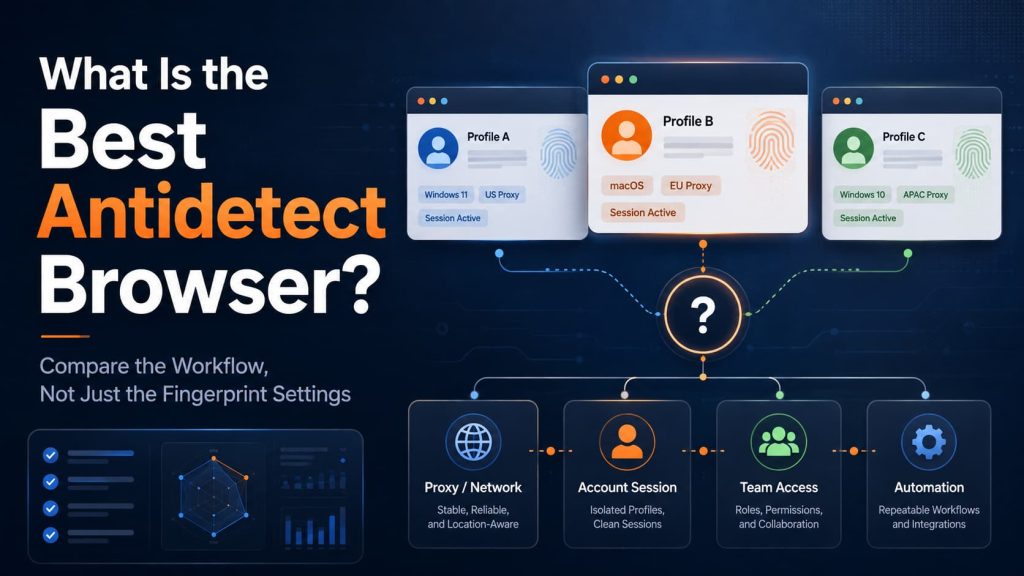
What is the best antidetect browser? A useful answer starts with what happens after the first profile launch.
The browser should be able to reopen the same account with the correct fingerprint settings, proxy, cookies, login state, permissions, and operating context. The functions required to maintain that context must also be available in the plan and deployment method the team will actually use.
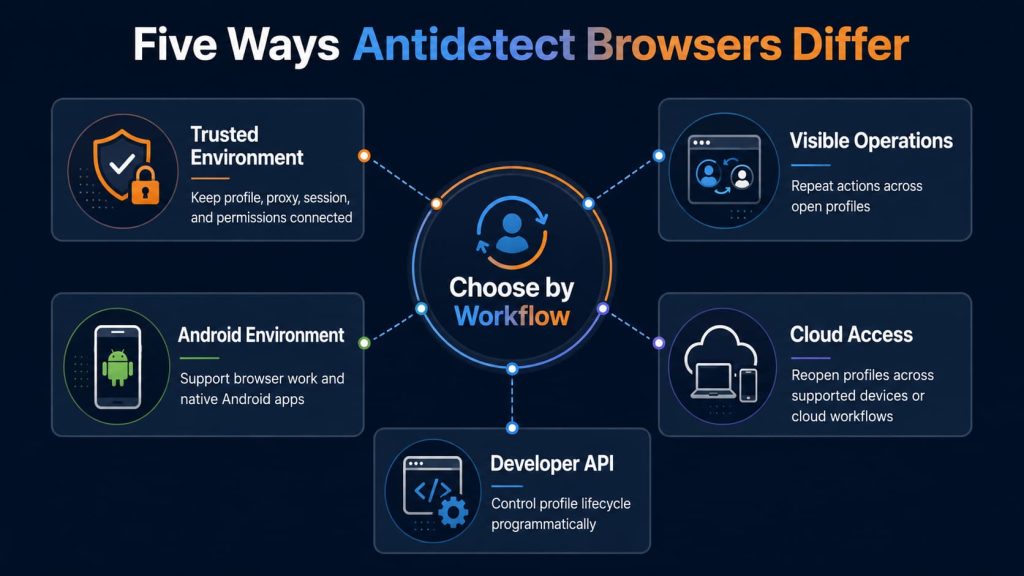
Products approach this task differently. Some emphasize visible bulk operations, some provide Android environments, some make profiles available through cloud infrastructure, and others offer deeper API control.
The best choice is therefore not necessarily the product with the longest list of fingerprint settings. It is the one that can preserve the account context required by the actual workflow.
Antidetect browsers should only be used for legitimate and authorized account management, testing, research, and automation. Browser-environment isolation does not override platform policies, account rules, or applicable laws.
What Is an Antidetect Browser?
An antidetect browser creates separate browser environments, usually called profiles, for different accounts, projects, or operating contexts.
Each profile may preserve its own:
- browser fingerprint settings;
- cookies and local storage;
- browsing history and login state;
- extensions;
- proxy connection;
- language, time zone, and location settings;
- notes, tags, ownership, and access permissions.
A standard browser already separates some local data between user profiles. An antidetect browser normally adds greater control over signals such as Canvas, WebGL, fonts, screen resolution, operating system information, browser version, language, time zone, and hardware-related values.
The purpose is not to make every profile as different as possible. The settings should also describe a logical device and network context.
A profile may look inconsistent when its proxy points to one country while its time zone, language, browser version, operating system, and device signals suggest several unrelated regions or devices. Adding more adjustable parameters does not resolve that conflict automatically.
An antidetect browser also cannot guarantee that an account will remain unrestricted. Platforms may evaluate account history, payment details, network quality, login patterns, operating behavior, and signals outside the browser fingerprint.
The First Profile Launch Tells You Very Little
Most products can create a profile, attach a proxy, and open a website during a short demonstration. The harder questions appear later:
- Does the account remain logged in after the profile is closed?
- Does the same proxy remain attached when another member opens it?
- Can an automated task use the profile without creating a separate session?
- Can the team identify who changed the proxy, permissions, or account notes?
- Does the environment still make sense after a browser or network change?
A reusable account environment contains more than browser fingerprint values.
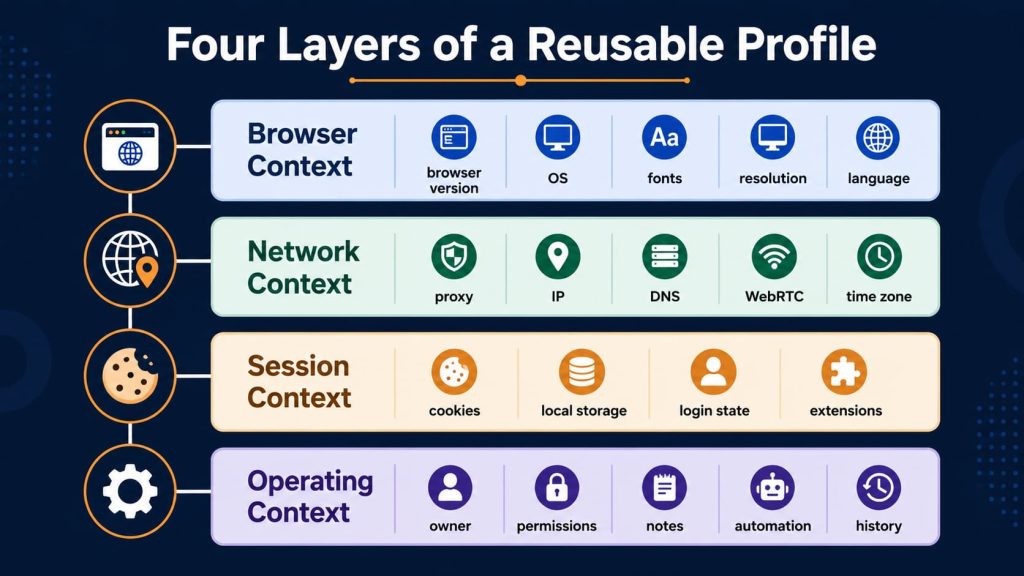
Browser context
The browser version, operating system, fonts, resolution, device signals, language, and time zone should form a reasonable combination.
Network context
The proxy, observed IP address, region, DNS behavior, WebRTC result, language, and time zone should not create unexplained conflicts.
Session context
Cookies, local storage, extensions, login state, and other browser data should remain attached to the correct profile.
Operating context
The team should know which account the profile contains, which proxy it uses, who owns it, who may access it, and whether a person or an automated task is operating it.
A strong antidetect browser keeps these contexts connected throughout the account’s working life. The products below differ mainly in how they create, share, automate, and recover that environment.
Antidetect Browsers Compared
Web4 Browser
Web4 Browser treats a browser environment as a connected account context rather than a collection of unrelated fingerprint settings.
Its product direction is to use AI to help build, check, and maintain a trusted environment in which browser signals, proxy and regional settings, cookies, local data, permissions, and automation remain attached to the same profile.
AI Agent, Skills/MCP workflows, headless execution, and task logs operate above that environment layer. They are intended to perform tasks within the assigned browser profile rather than create a separate session that loses the profile’s proxy, cookies, or permissions.
Web4 Browser is most relevant when a team’s main concern is maintaining a trusted browsing environment across repeated sessions, operator handoffs, and authorized automation.
Before adopting it, confirm which environment-building, diagnostic, automation, and collaboration functions are available in the current version and intended plan.
AdsPower
AdsPower is oriented toward teams that manage many visible browser profiles and repeat similar actions across them.
Its Synchronizer can reproduce actions from one active window across other open profiles. This is useful when operators need to watch each browser rather than send the entire task to a background script.
AdsPower also separates several automation methods:
- the Synchronizer repeats visible actions;
- RPA follows configured task steps;
- the Local API connects profiles to scripts or internal systems.
These methods are not interchangeable. Repeating a click across several windows is different from running a recoverable RPA process, and both differ from controlling browser profiles through an API.
AdsPower is a strong candidate when bulk profile organization, visible operations, no-code automation, and Local API access must coexist. Teams should confirm browser-engine support, operating-system support, member permissions, API availability, profile limits, and RPA access in the intended plan.
Multilogin
Multilogin combines browser profiles with Android cloud phones in the same broader workspace.
Browser profiles are intended for websites, dashboards, browser extensions, and web automation. Android cloud phones are intended for tasks that require a mobile operating system, installed applications, device-level state, and mobile interaction.
The product also provides defined workspace roles. Owners, managers, operators, and starters do not receive identical control over subscriptions, members, folders, profiles, and launches. This matters when administrators, developers, team leads, and operators share one workspace.
Its automation options include no-code API requests through Postman, CLI workflows, a built-in script runner, and integrations with Puppeteer, Selenium, and Playwright. It does not currently provide a visual RPA builder.
Multilogin deserves closer consideration when an organization needs structured access control and genuinely operates across both websites and Android applications. Browser profiles and cloud phones should still be tested separately because their storage, permissions, automation methods, and costs may differ.
GoLogin
GoLogin is a practical option when profiles need to remain available across supported devices or run through cloud-oriented workflows.
A persistent profile can retain fingerprint settings, proxy configuration, cookies, storage, and other browser state. Cloud browser access also allows supported automation tools to connect to a remotely running profile.
This can simplify profile access for distributed teams. It also changes where profile data is stored and how access is controlled.
GoLogin is better suited to users who value cloud-based access and do not require every profile to remain tied to one workstation. Teams with strict local-storage or infrastructure requirements should verify data location, profile synchronization, permission controls, proxy persistence, and session recovery.
Dolphin Anty
Dolphin Anty is closely associated with visible local browser operations, particularly in advertising and affiliate workflows.
Its profiles can be launched with browser automation access enabled, allowing compatible tools to connect through the DevTools Protocol. The desktop client remains part of this local automation model.
That requirement can be useful when an operator wants to observe, inspect, or take over an active browser session. It becomes a limitation when tasks are expected to run independently on remote infrastructure without maintaining an authorized desktop application.
Dolphin Anty is a stronger candidate when visible local profiles and CDP-compatible automation match the team’s operating model. Important checks include client availability, concurrent profile behavior, profile recovery, remote-deployment requirements, and whether automated sessions remain available for manual review.
Incogniton
Incogniton combines persistent browser profiles with team access, proxy configuration, synchronized actions, and API-based automation.
Its Synchronizer can reproduce visible actions across multiple browser profiles. This is useful when the profiles are sufficiently similar for the same interaction to make sense in every window.
Different page layouts, account states, pop-ups, or window sizes can cause synchronized profiles to diverge. A workflow that succeeds in one profile may therefore fail or perform the wrong action in another.
Incogniton is worth considering when a team wants an accessible profile-management interface without closing the path to synchronized operations or developer automation. Before committing, verify current API and framework support, team permissions, profile capacity, and whether the required features are included in the intended subscription.
MoreLogin
MoreLogin combines desktop browser profiles with Android cloud phones, but these environments follow separate execution models.
Browser profiles can be controlled through a local API connected to the desktop client. Cloud phones provide virtual Android devices for application installation, file transfer, task scheduling, and mobile automation.
This separation is useful when the team knows which tasks belong in a browser and which require Android. It becomes confusing when “mobile support” is treated as one feature without checking whether it means mobile browser access, an emulated device, or a persistent cloud phone.
MoreLogin is relevant when browser-based accounts and native Android workflows are both genuine operating requirements. Data persistence, proxy behavior, application compatibility, API access, team permissions, and billing should be evaluated separately for each environment.
Octo Browser
Octo Browser is oriented toward developer-led teams that want programmatic control over the profile lifecycle.
Its API covers operations such as creating, editing, transferring, launching, closing, importing, and exporting profiles. Proxies, tags, folders, and team access can also be integrated into internal systems.
Folders and tags solve different organizational problems. Folders can affect who may access a set of profiles, while tags help users categorize and filter profiles without necessarily changing permissions.
Octo Browser also distinguishes persistent profiles from disposable sessions. A one-time profile can be useful for an authorized temporary task, but it does not demonstrate whether a long-running account will retain its cookies, login state, ownership, and operating history.
Octo Browser is a strong candidate when the browser must become part of an internal platform rather than remain a standalone operator tool. Developers should confirm the required API operations, rate limits, profile types, framework connections, permission behavior, and plan restrictions.
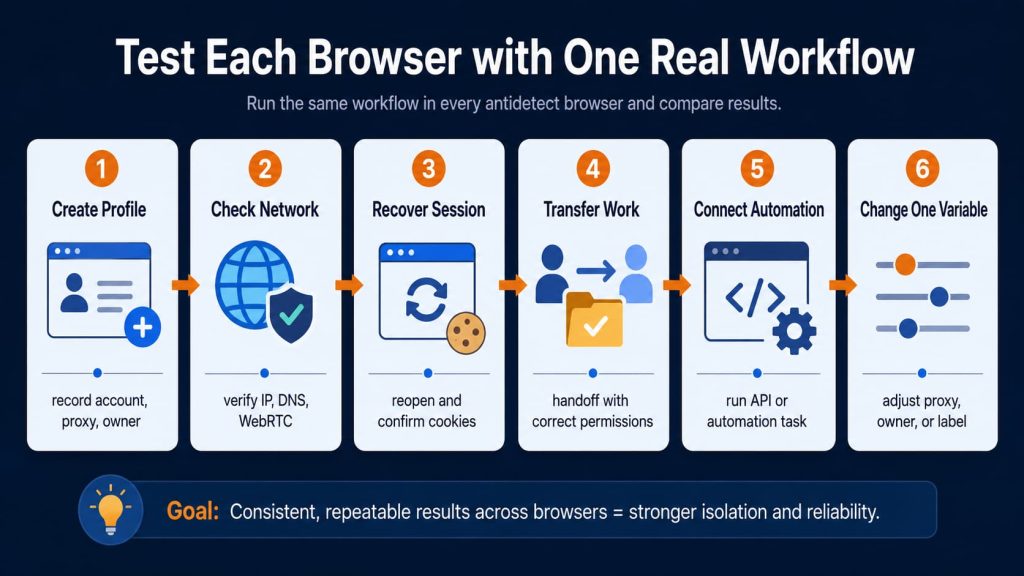
Test Each Browser with One Real Workflow
Fingerprint-checking websites can reveal obvious inconsistencies, but they cannot show whether a profile will remain usable after several days of real work.
Use one authorized test account and repeat the same workflow in every shortlisted product.
| Test | What to do | What a useful result looks like |
|---|---|---|
| Create the profile | Record the account, region, proxy, owner, purpose, and required environment | Another authorized operator can identify the profile without asking its creator |
| Check the network context | Verify the observed IP, region, language, time zone, DNS behavior, and WebRTC result | Browser and network information match the intended account context |
| Recover the session | Log in, complete a normal task, close the profile, and reopen it later | Cookies, login state, extensions, local data, proxy, and notes remain attached |
| Transfer the work | Give another member only the access required for the task | The member can understand and continue the work without receiving master credentials |
| Connect automation | Run the intended Synchronizer, RPA, API, CDP, Playwright, Puppeteer, or Selenium workflow | The task uses the correct profile and proxy, and its result remains available for review |
| Change one variable | Replace a test proxy, owner, group, or label and reopen the profile | The change is visible, traceable, and reversible |
Change only one important variable at a time. Replacing the proxy, browser settings, profile owner, and automation method in the same test makes it difficult to identify why a result changed.
A free plan or short demonstration may confirm that a profile opens. It may not reveal what happens when another member takes over or an API launches the profile. Teams that require headless execution inside the intended profile should also verify that the task preserves the correct proxy, cookies, permissions, and session state.
Eliminate Products with Hard Requirements First
Before comparing secondary features, remove products that cannot support the environment or execution method the workflow requires.
A native Android application requires a dedicated Android environment, not only a desktop browser profile. A cloud-based deployment cannot be evaluated in the same way as automation that depends on a locally running desktop client. Visual synchronized actions, no-code RPA, and programmatic API control also solve different operating problems.
Team permissions can be equally decisive. A product may preserve the profile correctly but still be unsuitable if every operator receives excessive access or if ownership, changes, and task history cannot be reviewed.
These requirements should reduce the list before minor differences in fingerprint controls, interface design, or included profile counts are compared.
So, What Is the Best Antidetect Browser?
The best antidetect browser is the one that preserves the account context required by the real workflow—not only during the first launch, but after the profile is reopened, transferred to another operator, or connected to automation.
The answer changes when the workflow has a hard requirement. Web4 Browser is relevant when maintaining a trusted browsing environment and keeping AI tasks attached to the assigned profile are priorities. AdsPower and Incogniton are stronger starting points for visible synchronized operations. Multilogin and MoreLogin deserve closer attention when native Android applications are required. GoLogin fits cloud-oriented profile access, Dolphin Anty supports locally controlled browser automation, and Octo Browser provides deeper programmatic control over profile lifecycles.
After removing products that cannot meet the required environment type, execution method, team permissions, or automation model, test the remaining options with the same authorized account and task. The product that preserves the correct profile, proxy, session state, permissions, and operating history throughout that test is the best antidetect browser for that workflow.